Java Support
You can now use CodSpeed to benchmark Java codebases thanks to our new integration with JMH.
JMH is the de-facto standard for JVM microbenchmarking, designed by the OpenJDK team to deal with the complexities of benchmarking on the JVM. What it doesn't do is keep things stable across CI runs or tell you when a pull request just regressed a hot path. That's where CodSpeed comes into play.
Quick Start
The integration works with both Maven and Gradle, see the documentation for details on how to set it up.
Write benchmarks with the standard JMH API:
import org.openjdk.jmh.annotations.Benchmark;
public class FibBenchmark {
static int fib(int n) {
return n < 2 ? n : fib(n - 1) + fib(n - 2);
}
@Benchmark
public int benchFib10() {
return fib(10);
}
}Then run them in CI with the CodSpeed Action. For now, only Walltime mode is supported.
- name: Run the benchmarks
  uses: CodSpeedHQ/action@v4
  with:
    mode: walltime
    run: java -jar bench.jar
Benchmarks also run locally using the CodSpeed CLI:
codspeed run --mode walltime -- java -jar bench.jarFor more information, check out the Java documentation and the JMH Benchmark Guide.
Ask the Wizard (@codspeedbot) right from GitHub
When a benchmark regresses, the investigation usually starts in a pull request
comment, and that's exactly where it should end too. Mention @codspeedbot in
any pull request comment, issue comment, or review comment and the
Wizard will analyze your performance data, explain what happened, and propose a
fix directly in GitHub.
What you can ask
Performance breakdown: get a summary of how a branch affects performance before merging.
@codspeedbot what's the performance impact of this PR?Explain a regression: the Wizard inspects the flamegraph, identifies the root cause, and writes up a plain-language explanation.
@codspeedbot explain the regression on bench_parsePropose a fix: the Wizard investigates the regression and opens a pull request with a targeted code change.
@codspeedbot fix the regression on bench_serializeAdd benchmarks: request coverage for a specific function or module and the Wizard will write the benchmarks and open a PR.
@codspeedbot add a benchmark for the parse_config functionTry it
The CodSpeed GitHub App must be installed on your repository. Then drop a comment in any pull request and let the Wizard take it from there.
Learn more in the Wizard documentation.
CodSpeed for Agents: MCP Server and Skills
Investigating a regression usually means switching between your editor, the CodSpeed dashboard, and a flamegraph viewer. The CodSpeed MCP server and agent skills bring all of that into your AI assistant, so you can go from "this function is slow" to a fix without leaving your workflow.
MCP Server
The MCP server gives your AI assistant direct access to your performance data through five tools:
- Query flamegraphs: surface the functions with the highest self time, walk the call tree, and let your assistant cross-reference hot spots with your source code to suggest targeted fixes.
- Compare runs: generate a full performance report between any two runs, with benchmark-level diffs showing regressions, improvements, and new or missing benchmarks.
- Get run details: inspect a single run and its benchmark results.
- List runs: browse recent performance runs with commit, branch, and PR info.
- List repositories: see all your CodSpeed-enabled repositories.
Agent Skills
Skills teach your assistant how to act on the data. Two skills ship today:
codspeed-optimize:
turns your assistant into an autonomous performance engineer. Point it at a slow
function or a regression and it loops: measure, analyze the flamegraph, make a
targeted change, re-measure, compare, until there is nothing left to gain.
codspeed-setup-harness:
handles the initial benchmark setup. It detects your project structure, picks
the right framework for your language, writes benchmarks, and verifies
everything works. Supports Rust, Python, Node.js, Go, C/C++, and more.
Try it
Install the CodSpeed plugin in Claude Code to get the MCP server and skills in one step:
/plugin marketplace add CodSpeedHQ/codspeed
/plugin install codspeed
Or add the MCP server to any compatible tool separately:
npx add-mcp https://mcp.codspeed.io/mcp --name CodSpeedAnd install the agent skills:
npx skills add CodSpeedHQ/codspeedThen ask your assistant something like:
- "Make my
parse_inputfunction faster." - "There's a regression on
feat/parser, investigate and fix it." - "Add benchmarks to this project."
Learn more about the MCP server and agent skills.
Introducing CodSpeed CLI: Benchmark Anything
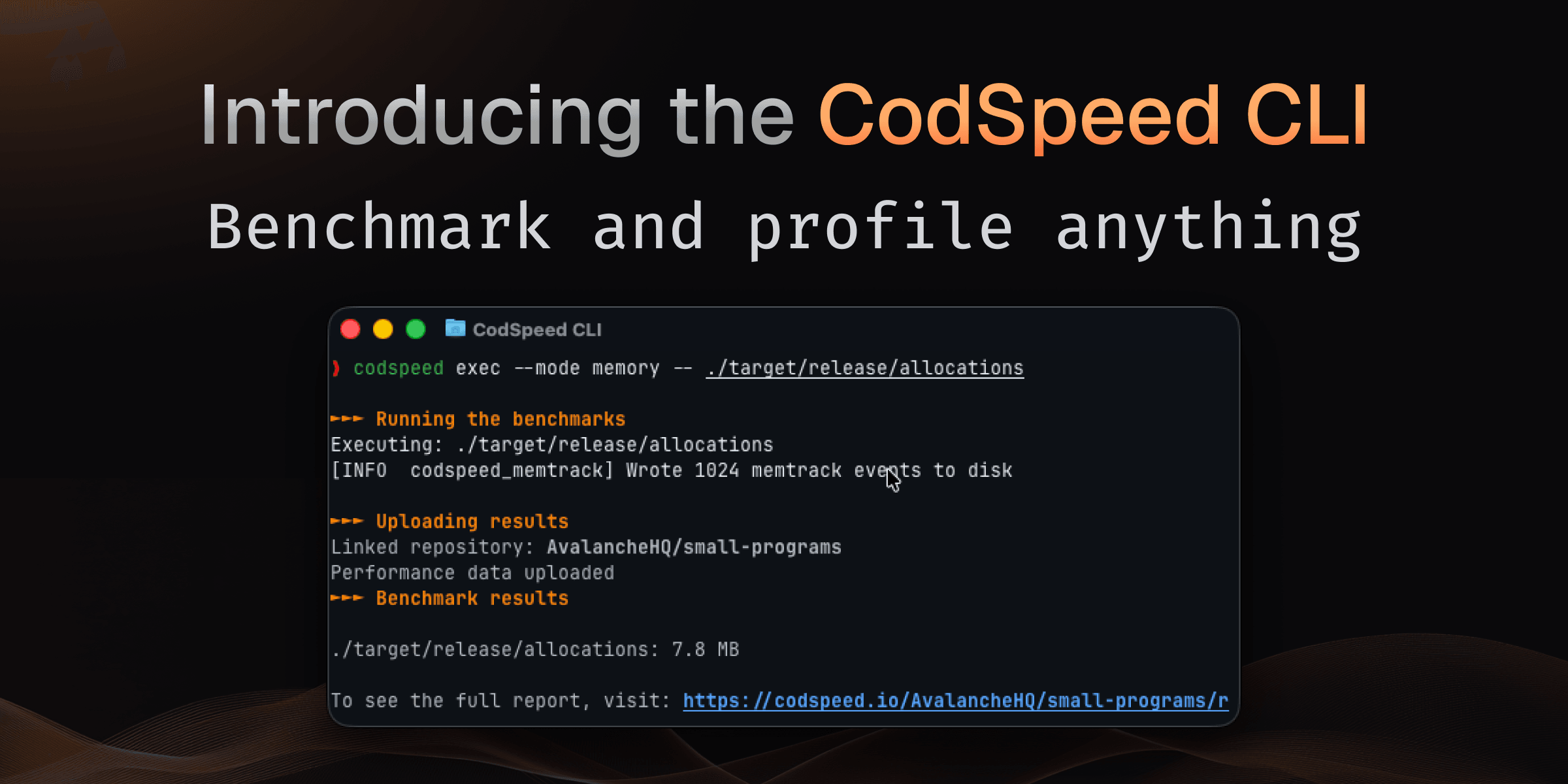
Whether you're profiling a Python script, a compiled binary, or a production workload, benchmarking usually means choosing a framework, writing test harnesses, and integrating with language-specific tooling.
With the CodSpeed CLI, you can benchmark any executable program with a single command no code changes, no framework required. You can benchmark anything.
codspeed execHow It Works
Run the following commands to benchmark any program directly:
# Benchmark a binary
codspeed exec --mode memory -- ./my-binary --arg1 value

# Benchmark a script
codspeed exec --mode simulation -- python my_script.py

# Benchmark with specific config
codspeed exec --mode walltime --max-rounds 100 -- node app.js
No code changes needed. CodSpeed wraps your program, measures performance, and provides instrument results automatically.
Three Measurement Instruments
Choose the right instrument for your use case:
Simulation Mode: CPU simulation for <1% variance and hardware-independent measurements. Perfect for catching regressions in CI.
Walltime Mode: Real-world execution time including I/O, network, and system effects. Ideal for end-to-end performance testing.
Memory Mode: Heap allocation tracking to identify memory bottlenecks and optimize resource usage.
Config-Based Benchmarking with codspeed run
To keep benchmarks versioned alongside your code, and be able to run them easily
locally or in CI, define them in a codspeed.yml file:
benchmarks:
  - name: "JSON parsing"
    run: "./parse-json input.json"
    mode: simulation

  - name: "API response time"
    run: "python fetch_users.py"
    mode: walltime
    warmup: 3
    min_time: 10s

  - name: "Data processing pipeline"
    run: "./process-data --input large.csv"
    mode: memory
Then execute with:
codspeed run -m walltimeOpen Source and Available Now
The entire CodSpeed CLI is now open source. Check out the code, contribute, and adapt it to your workflow:
Installation is a single command:
curl -fsSL https://codspeed.io/install.sh | bashTry It Yourself
Start benchmarking any executable today. Install the CLI, run codspeed exec on
your program, and see detailed performance results in your dashboard.
Give us a star on GitHub if you find it useful, and check out the CLI documentation to learn more about configuration options, instruments, and language integrations.
Search and Filter Benchmarks
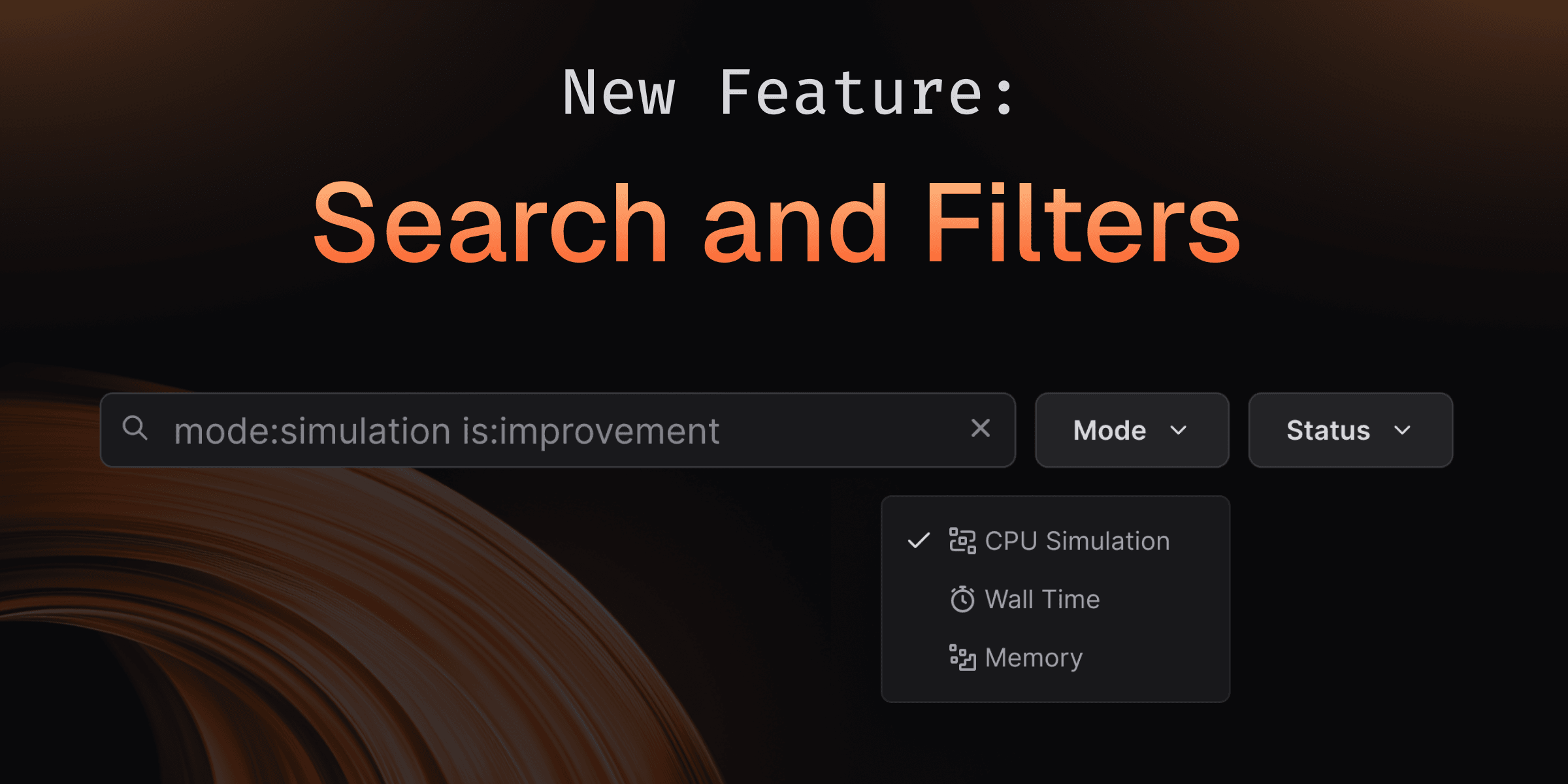
Finding the right benchmark in a repository with thousands of results and multiple instruments used to mean endless scrolling. With Search and Filtering, you can instantly navigate benchmark suites of any size—whether you have 10 or 10,000 benchmarks using powerful GitHub-style filters, text search, and smart pagination that keeps everything fast and responsive.
How It Works
Use the search bar on any branch, comparison, or run page to quickly filter benchmarks.
Text search
Type any part of a benchmark name or path. Multiple space-separated terms work as AND filters to narrow results further.
Status filters
Use is: syntax to filter by benchmark state:
is:regression- Show performance regressionsis:improvement- Show performance improvementsis:archived- Show archived benchmarksis:ignored- Show ignored benchmarksis:skipped- Show skipped benchmarksis:new- Show newly added benchmarksis:untouched- Show unchanged benchmarks
Mode filters
Filter by instrumentation mode:
mode:simulation- Show only simulation mode resultsmode:walltime- Show only walltime mode resultsmode:memory- Show only memory mode results
Combine filters
For example,
is:regression mode:simulation optimizefinds all regressions in simulation mode with "optimize" in the name or path.
Try It Yourself
Search and filtering is available now on all your benchmark pages. Try it on your next benchmark run—search for specific tests, filter by performance changes, or explore archived benchmarks with zero lag!
Meet the Memory Instrument: Track Memory Consumption Too
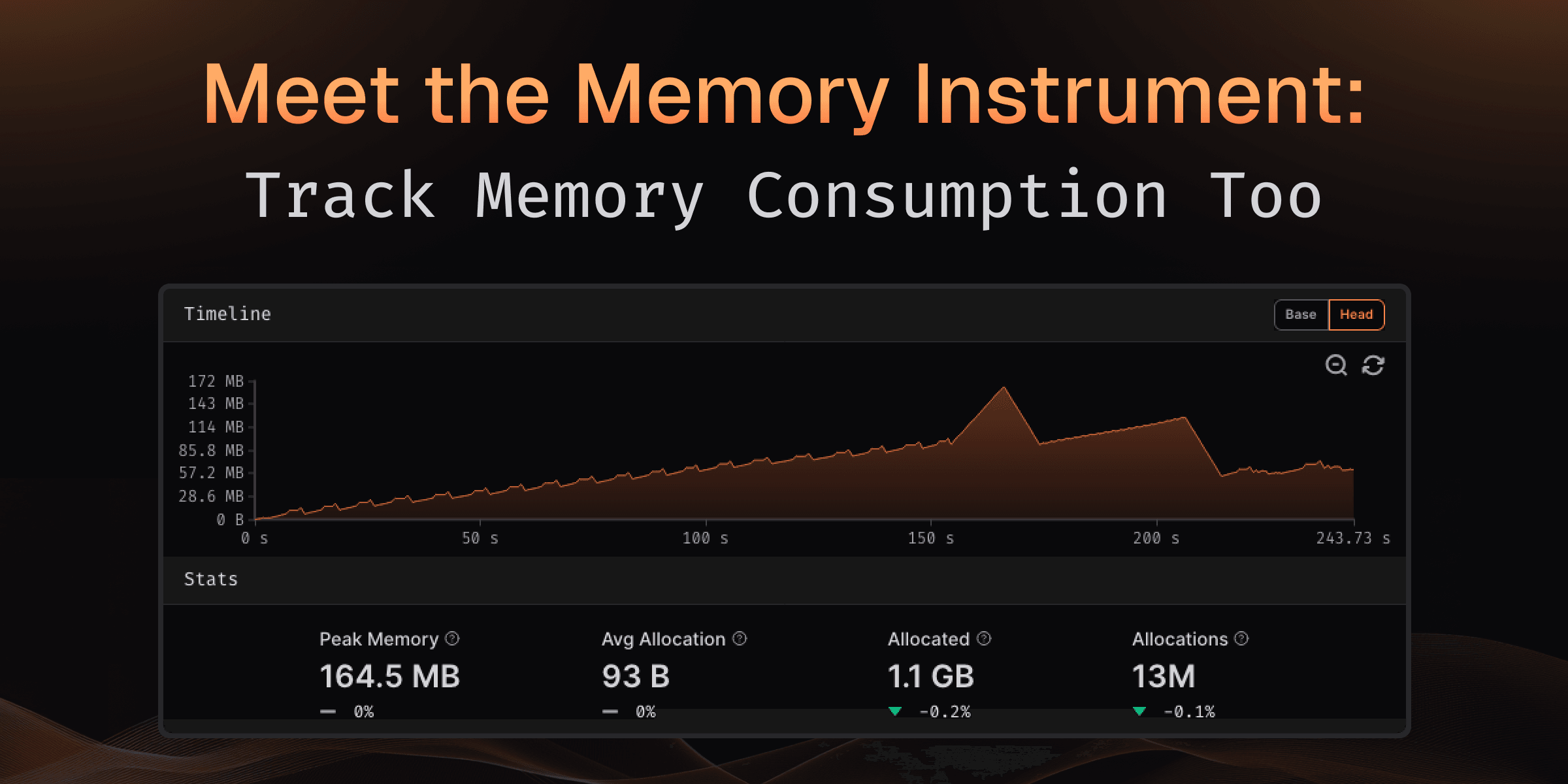
Performance isn't just about execution time—memory consumption matters just as much. Memory leaks, excessive allocations, and growing peak usage can silently degrade performance or cause unexpected behavior in production.
The new Memory Instrument automatically tracks memory allocations, deallocations, and peak consumption during every benchmark run, helping you identify memory bottlenecks before they become problems.
Demo of the Memory Instrument tracking allocations and peak memory usage
What You Get
Every memory-instrumented benchmark run now includes comprehensive memory metrics that help you understand allocation behavior:
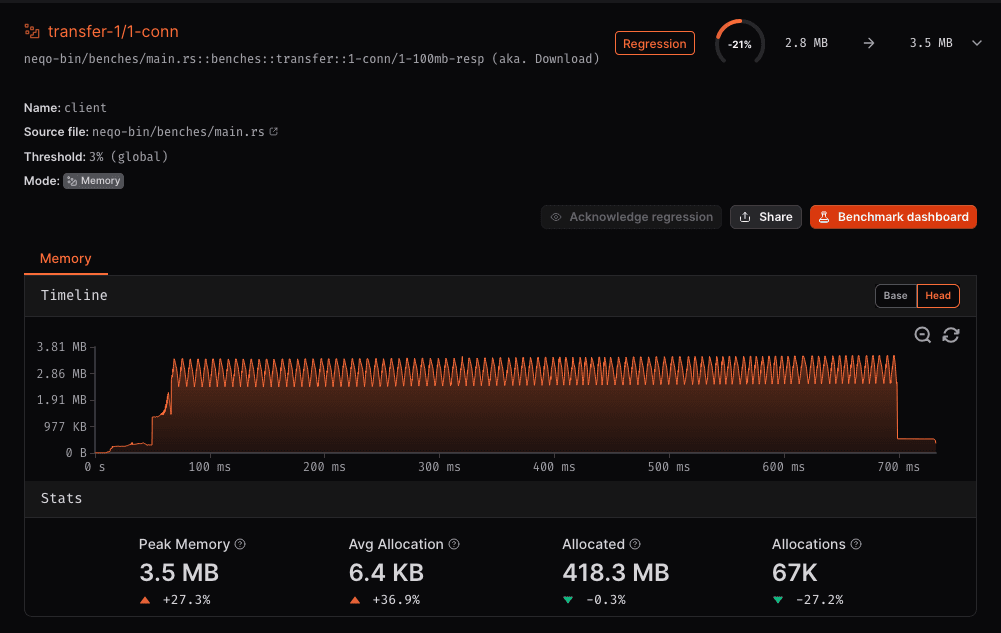
Timeline showing allocation and deallocation patterns throughout execution
Memory Statistics
- Peak Memory: Maximum memory consumed during benchmark execution
- Average Allocation Size: Mean size of individual memory allocations
- Total Allocated: Cumulative memory allocated throughout execution
- Total Allocations: Number of allocation operations performed
All metrics show comparison between baseline and current runs, with clear indicators of whether memory usage increased or decreased.
Memory Timeline Visualization
The timeline graph shows exactly how memory consumption changes throughout your benchmark:
- Real-time tracking: See memory allocations and deallocations as they happen
- Peak identification: Quickly spot when and where peak memory occurs
- Zoom and pan: Navigate through the timeline to examine specific periods
Finding Memory Issues
The Memory Instrument helps you identify common memory problems:
- Growing peak memory between runs? You may have introduced a memory leak or increased working set size
- High number of allocations? Consider object pooling or reducing temporary allocations
- Large average allocation size? Review whether you're allocating more memory than necessary
- Spiky timeline pattern? Your code may benefit from pre-allocation or memory reuse strategies
What's Coming Next?
We're continuing to expand memory analysis capabilities:
- Memory leak detection: Automatic identification of memory that wasn't freed
- Allocation hotspots: Flame graphs showing which functions allocate the most memory
- Garbage collection metrics: Track the impact of GC on memory usage and performance
The Memory Instrument gives you the visibility you need to write memory-efficient code with confidence.
Try It Now
Simply configure your workflow to use the memory runner:
- uses: CodSpeedHQ/action@v4
  with:
    runner: memory # Enable memory instrumentation #
Memory instrumentation is available on all runners now for Rust and C/C++ benchmarks, with more languages coming soon.
Learn more about the Memory Instrument.
Find CPU and Memory Bottlenecks with Performance Counters
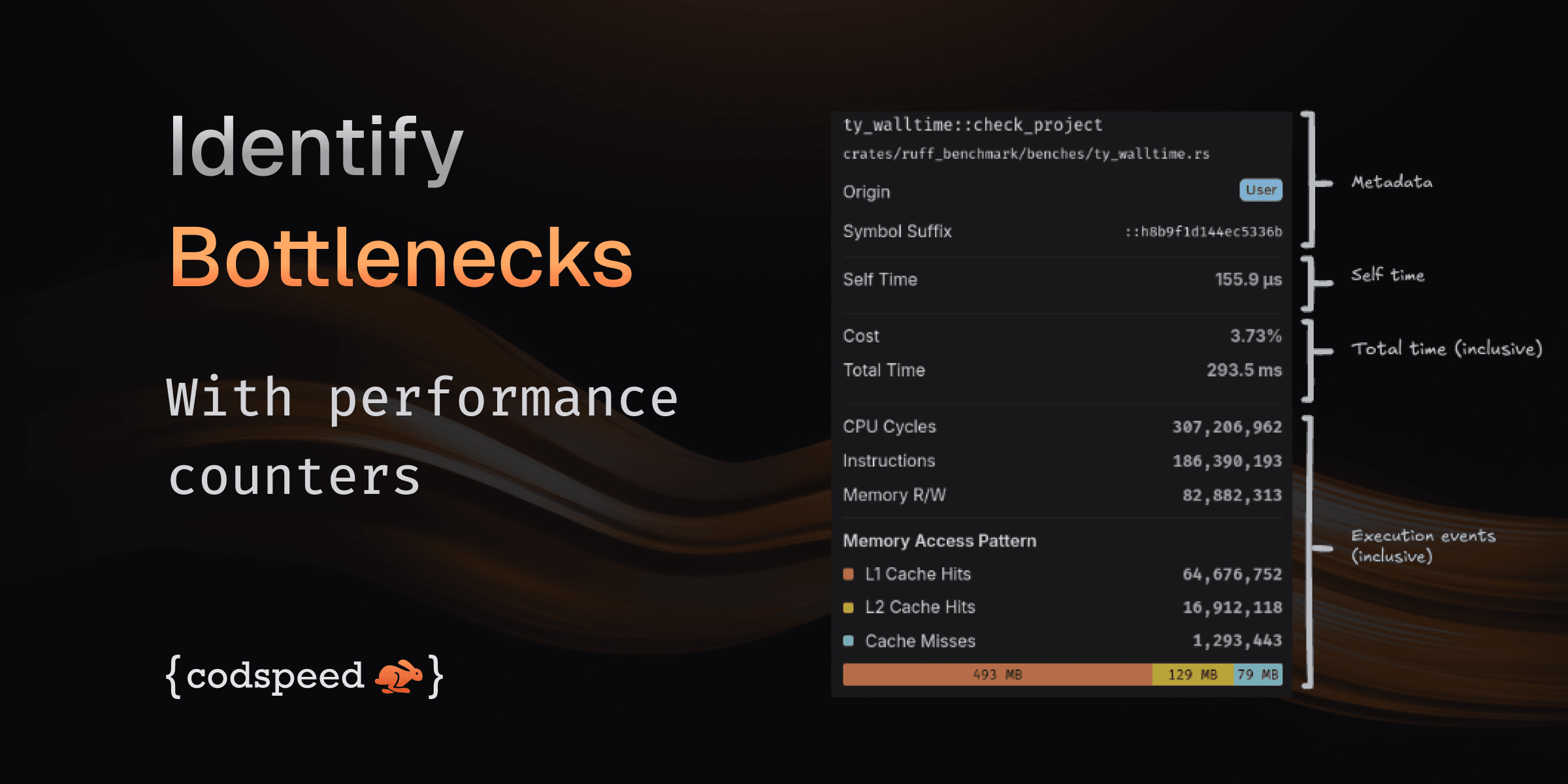
Understanding that your code is slow is one thing. Understanding why it's slow is what lets you fix it. Walltime profiling now automatically collects hardware performance counters during execution, giving you deep insights into CPU cycles, instruction counts, memory operations, and cache behavior.
Performance counters showing cache behavior and memory traffic
What You Get
Every walltime profile now includes comprehensive hardware metrics that help you pinpoint performance bottlenecks:
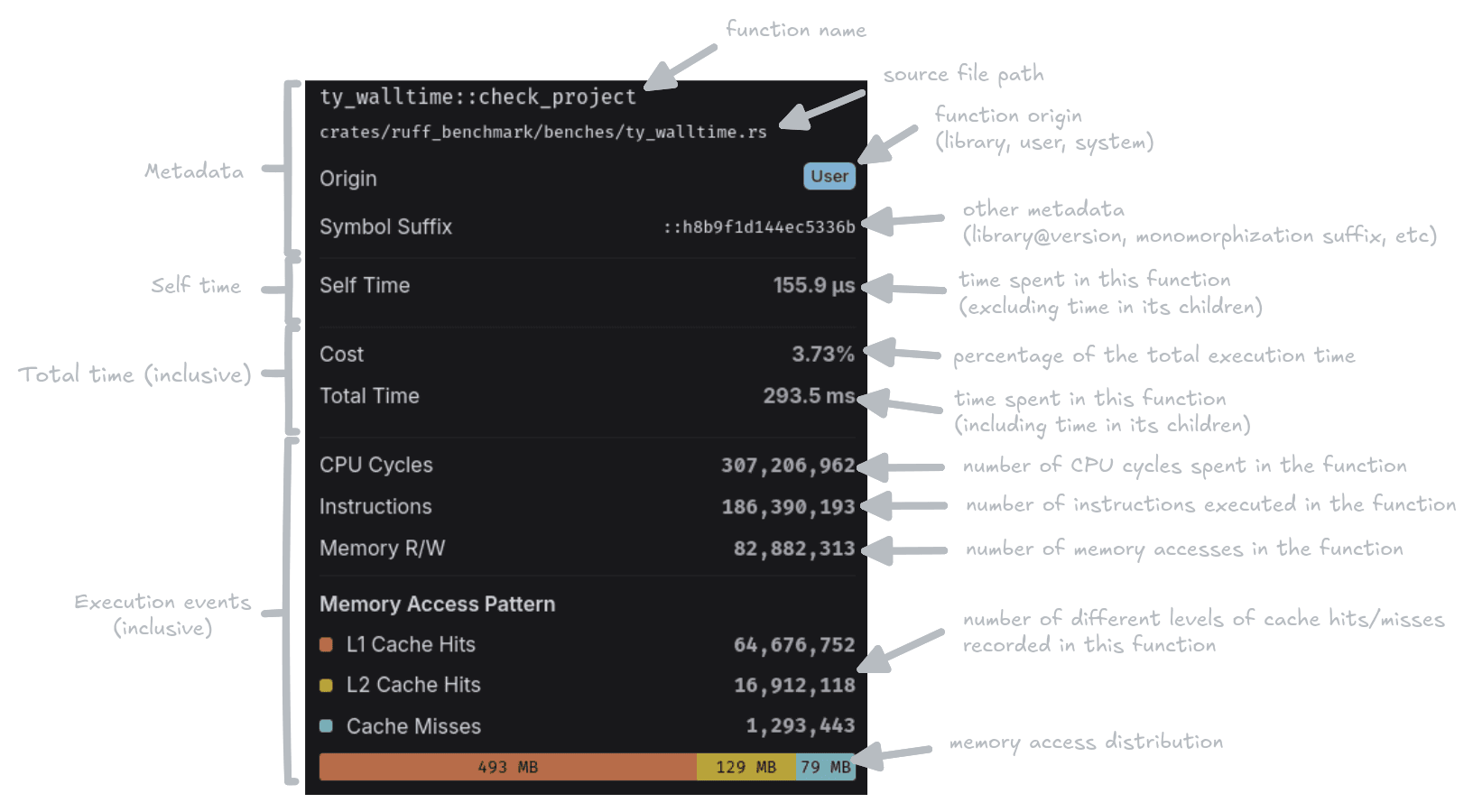
CPU Metrics
- CPU Cycles: Total number of CPU cycles elapsed during execution
- Instructions: Number of CPU instructions executed
Memory Metrics
- Memory R/W: Total memory read and write operations performed
Memory Access Pattern
See exactly how your memory accesses are served with a detailed breakdown:
- L1 Cache Hits: Fastest memory accesses served from L1 cache
- L2 Cache Hits: Accesses served from second-level cache
- Cache Misses: Expensive accesses requiring main memory fetch
- Memory Access Distribution: Total bytes transferred at each cache level, calculated based on access patterns and cache line sizes
Finding the Bottleneck
The visual memory access pattern gauge shows at a glance where your code spends its time:
- High L1 cache hit rate? Your data access patterns are efficient.
- Lots of cache misses? Consider restructuring data layouts or reducing memory footprint.
- Large memory access distribution across all levels? Your working set may be too large for cache, consider processing data in smaller chunks.
Combined with the flame graph, you can now trace performance issues from high-level function calls down to specific memory access patterns causing slowdowns.
Available Now
Performance counters are automatically collected when running benchmarks on CodSpeed Macro Runners with walltime profiling enabled.
Learn more about Walltime Profiling.
Meet the Wizard: One Click to Set Up CodSpeed
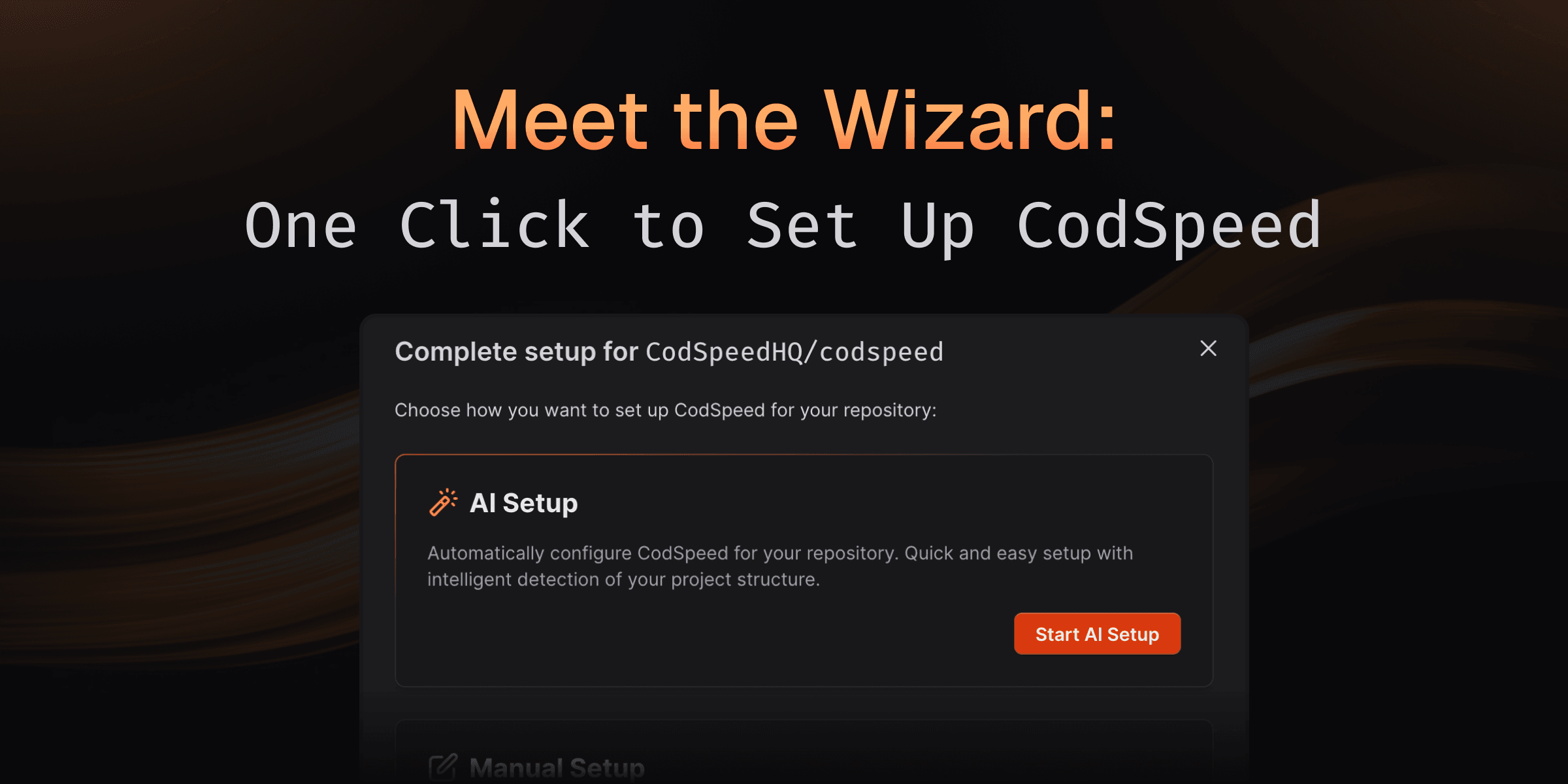
Setting up continuous performance checks shouldn't take hours of reading docs, configuring workflows, and hoping you got everything right.
With the CodSpeed Wizard, our agent handles it all in one click. Detecting your project structure, hooking up benchmarks to the CodSpeed Harness, and generating optimized CI workflows.
Watch the Wizard set up a repository (dtolnay/anyhow) from scratch
How It Works
The Wizard analyzes your repository and handles the entire setup process:
- Detects existing benchmarks: Automatically finds and configures your benchmarks in the language and framework you're using.
- Creates benchmarks if needed: No benchmarks yet? The Wizard generates appropriate benchmark files for your project
- Generates CI workflows: Creates optimized GitHub Actions or GitLab CI configurations tailored to your setup
- Opens a pull request: All changes are submitted as a PR for you to review and merge
The entire process takes minutes instead of hours, and you can review every change before merging.
Codebase Integration
The Wizard doesn't just template files—it understands your project:
- Detects your testing framework and build system
- Identifies the right directories for benchmark files
- Configures appropriate runner settings based on your needs
- Ensures compatibility with your existing CI pipeline
Whether you're adding CodSpeed to a mature project with established benchmarks or starting fresh, the Wizard adapts to your workflow.
What's Coming Next?
The Wizard is just getting started. We're working on even more powerful capabilities:
- On-demand benchmarks: Add new benchmarks for specific functions or modules directly from your dashboard
- GitHub-native performance fixes: Comment on performance regressions in pull requests and let the Wizard automatically investigate and propose optimizations
- Continuous optimization: Proactive suggestions for benchmark coverage and performance improvements as your codebase evolves
The future of performance monitoring is automated, intelligent, and seamlessly integrated into your workflow.
Try It Yourself in One Click
From your CodSpeed dashboard, click "Configure repository" and then "Start AI Setup" to let the Wizard do the work. You'll have a pull request ready for review in minutes, complete with all the configuration needed to start tracking performance.
Ready to automate your setup? Head to your dashboard and try it out.
Simpler Authentication with OIDC
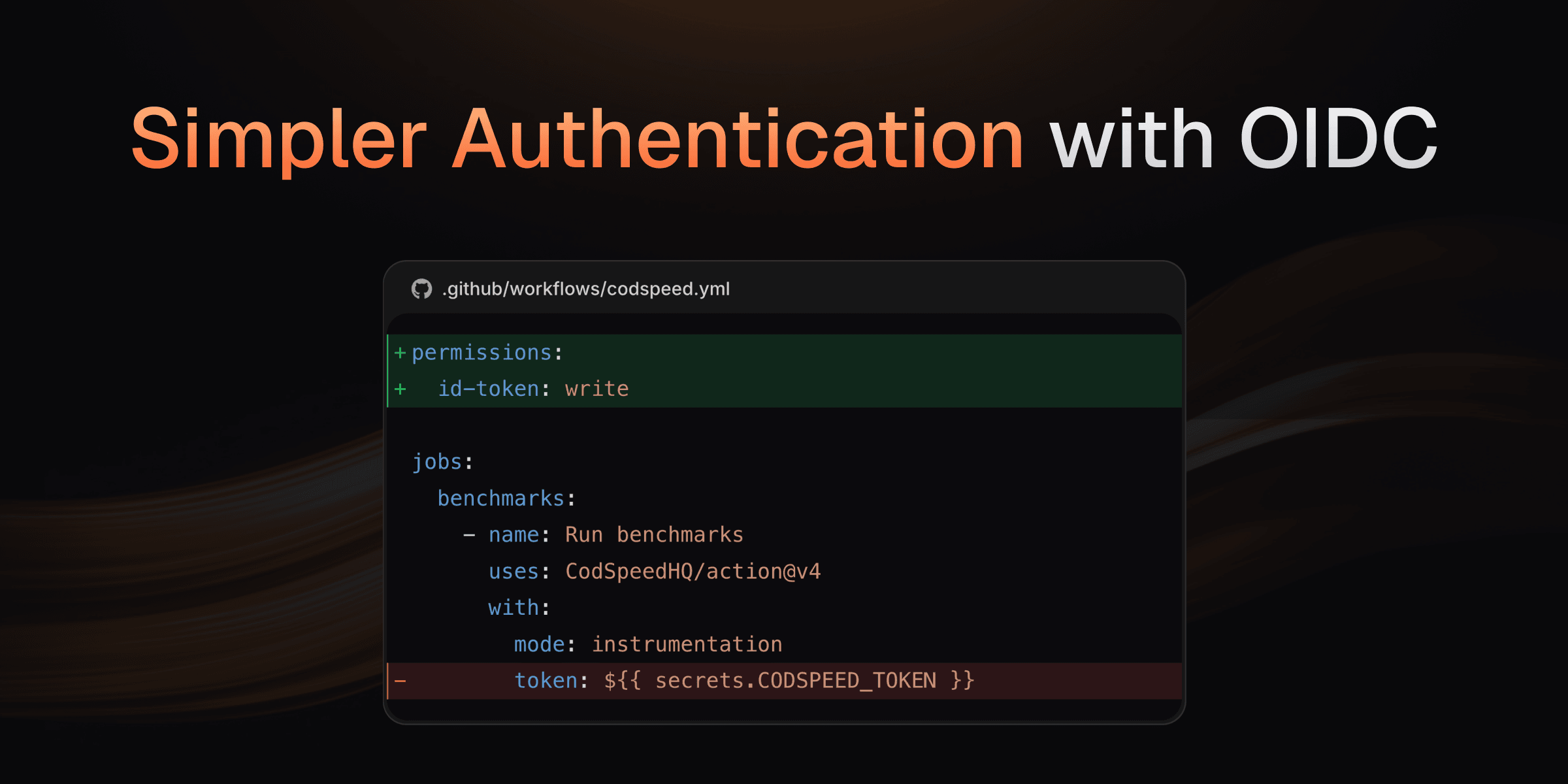
You can now authenticate your CI workflows using OpenID Connect (OIDC) tokens
instead of CODSPEED_TOKEN secrets. This makes integrating and authenticating
jobs safer and simpler. OIDC uses short-lived tokens automatically generated by
your CI provider (GitHub Actions or GitLab CI). These tokens are
cryptographically signed and verified, eliminating the need to manage long-lived
secrets.
Backward compatible: Existing workflows using CODSPEED_TOKEN, or public
repositories without a token will continue to work without any changes.
How to migrate
GitHub Actions
To use OIDC authentication in GitHub Actions:
- Add the required permissions to your workflow file.
- Remove the
tokeninput from the CodSpeed action step.
Here's an example of migrating a GitHub Actions workflow:
name: Benchmarks

on:
  push:
    branches: [main]
  pull_request:

jobs:
  benchmarks:
    runs-on: ubuntu-latest
    permissions:
      contents: read # required for actions/checkout
      id-token: write # required for OIDC authentication with CodSpeed
    steps:
      - uses: actions/checkout@v4
      - uses: actions/setup-node@v4
      - ... # other setup steps
      - name: Run Benchmarks
        uses: CodSpeedHQ/action@v4
        with:
          run: npm run bench
          mode: instrumentation
          token: ${{ secrets.CODSPEED_TOKEN }}
For public repository forks where OIDC tokens aren't available, CodSpeed automatically falls back to the existing tokenless validation process.
Learn more in our GitHub Actions documentation.
GitLab CI
To use OIDC authentication in GitLab CI:
- Add the
CODSPEED_TOKENvariable as an OIDC token in your job configuration. - Remove the
CODSPEED_TOKENsecret from your project settings.
Here's an example of migrating a GitLab CI workflow:
workflow:
  rules:
    - if: $CI_PIPELINE_SOURCE == 'merge_request_event'
    - if: $CI_COMMIT_BRANCH == $CI_DEFAULT_BRANCH
codspeed:
  id_tokens:
    CODSPEED_TOKEN:
      aud: codspeed.io
  stage: test
  image: python:3.12
  before_script:
    - pip install -r requirements.txt
    - curl -fsSL https://codspeed.io/install.sh | bash
    - source $HOME/.cargo/env
  script:
    - codspeed run --mode instrumentation -- pytest tests/ --codspeed
Learn more in our GitLab CI documentation.
Finer Change Detection with Custom Benchmark Thresholds
Different benchmarks have different performance characteristics. For example, benchmarks with I/O operations or multi-processing can vary more between runs. These kind of variability is inherent to the benchmark, no matter how we measure it. A single global regression threshold treats all benchmarks the same, which means either accepting false positives from variable benchmarks or missing real regressions in stable ones.
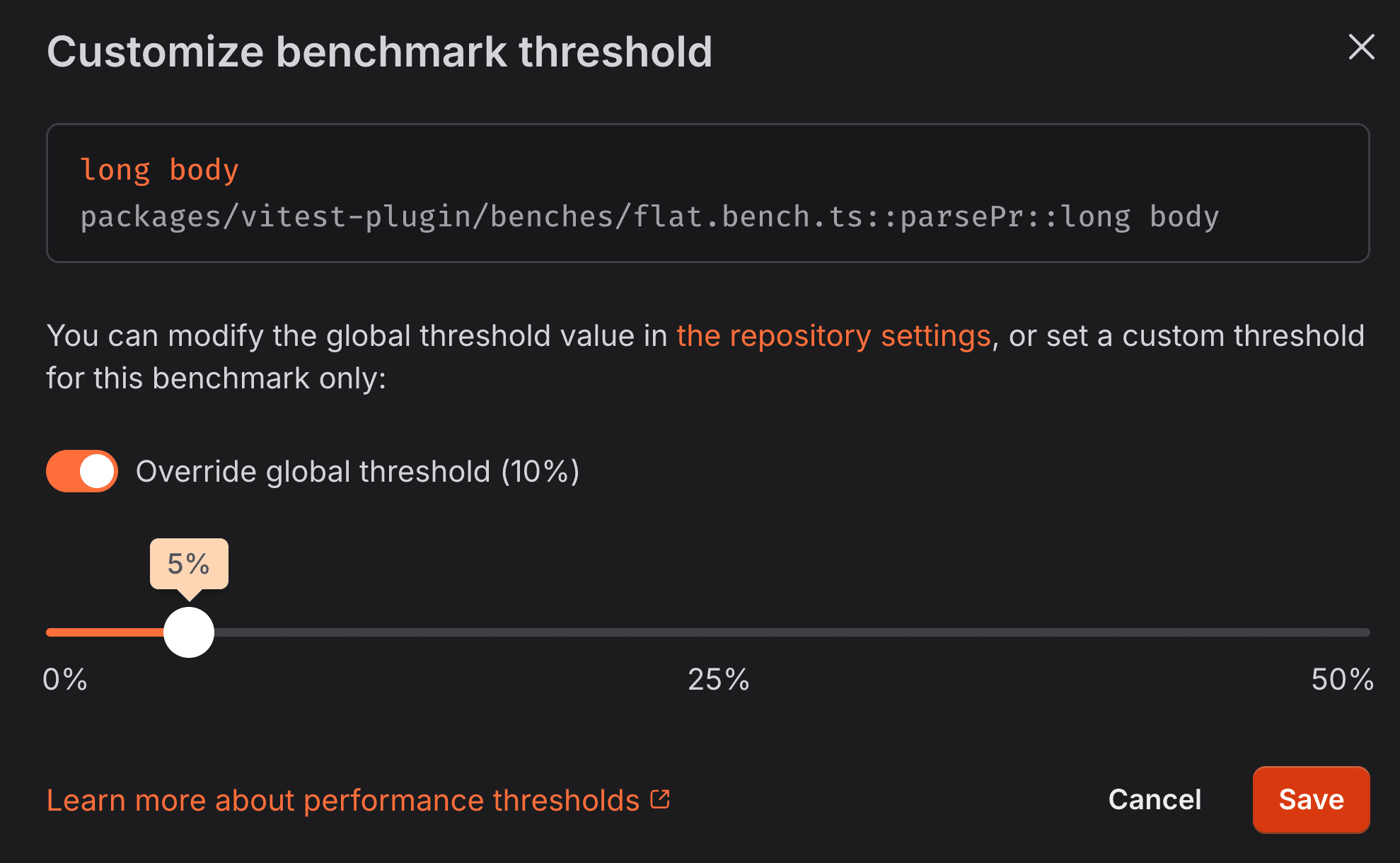
Set a custom threshold between 0% and 50% for any benchmark
You can now set custom regression thresholds for individual benchmarks. Be strict for stable microbenchmarks using the CPU simulation instrument, and more lenient for macro-benchmarks with the walltime instrument that may have more inherent variability.
Each benchmark gets the right threshold for its characteristics, helping you catch real performance issues without false positives.
Learn more
Check out our documentation to learn more about:
Better granularity with Inlining Information
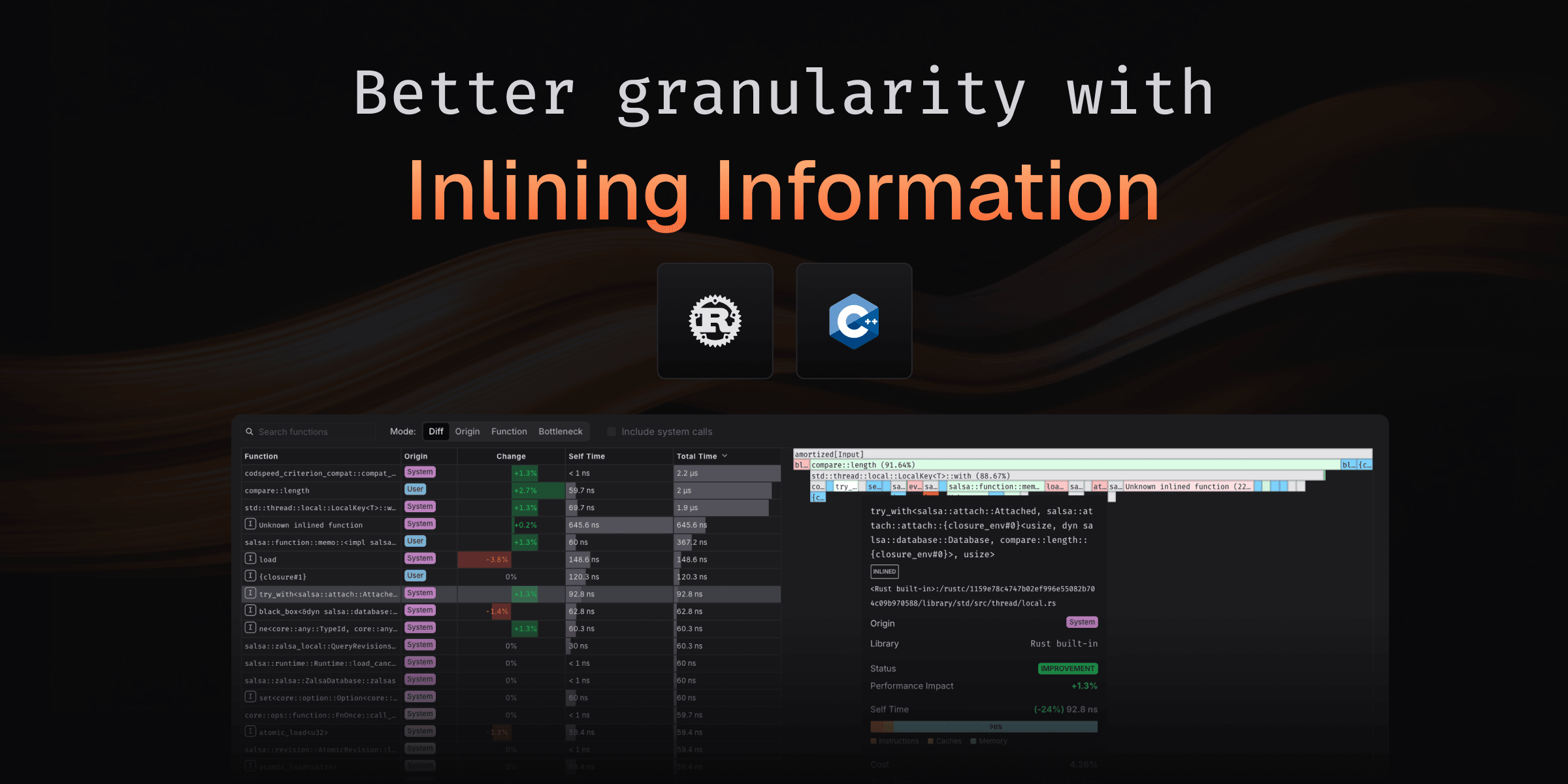
Ever compared two benchmark runs and wondered why performance changed when you didn't touch the code? Often, the culprit is function inlining: a compiler optimization that can make frames appear to vanish from your flamegraphs.
Now, CodSpeed automatically detects and displays inlined frames in your flamegraphs, giving you complete visibility into how compiler optimizations affect your performance profile.
What you get
When viewing differential flamegraphs, inlined frames are explicitly marked, so you can instantly tell whether performance differences are due to:
- Compiler optimization changes between builds
- Different optimization flags (
-O2vs-O3) - Actual code changes in your application
This makes it easier to understand mysterious performance shifts, especially when comparing:
- Builds with different optimization levels
- Before and after dependency updates
- Code changes that may affect inlining decisions
How it works
The inlining information is automatically detected and displayed when using the CPU simulation instrument, no configuration needed. Inlined frames appear as marked nodes in your flamegraphs, making the call graph even more complete and accurate.
See it in action
Check out this real-world example from the
salsa project showing inlined frames in
differential flamegraphs:
Check out the complete run
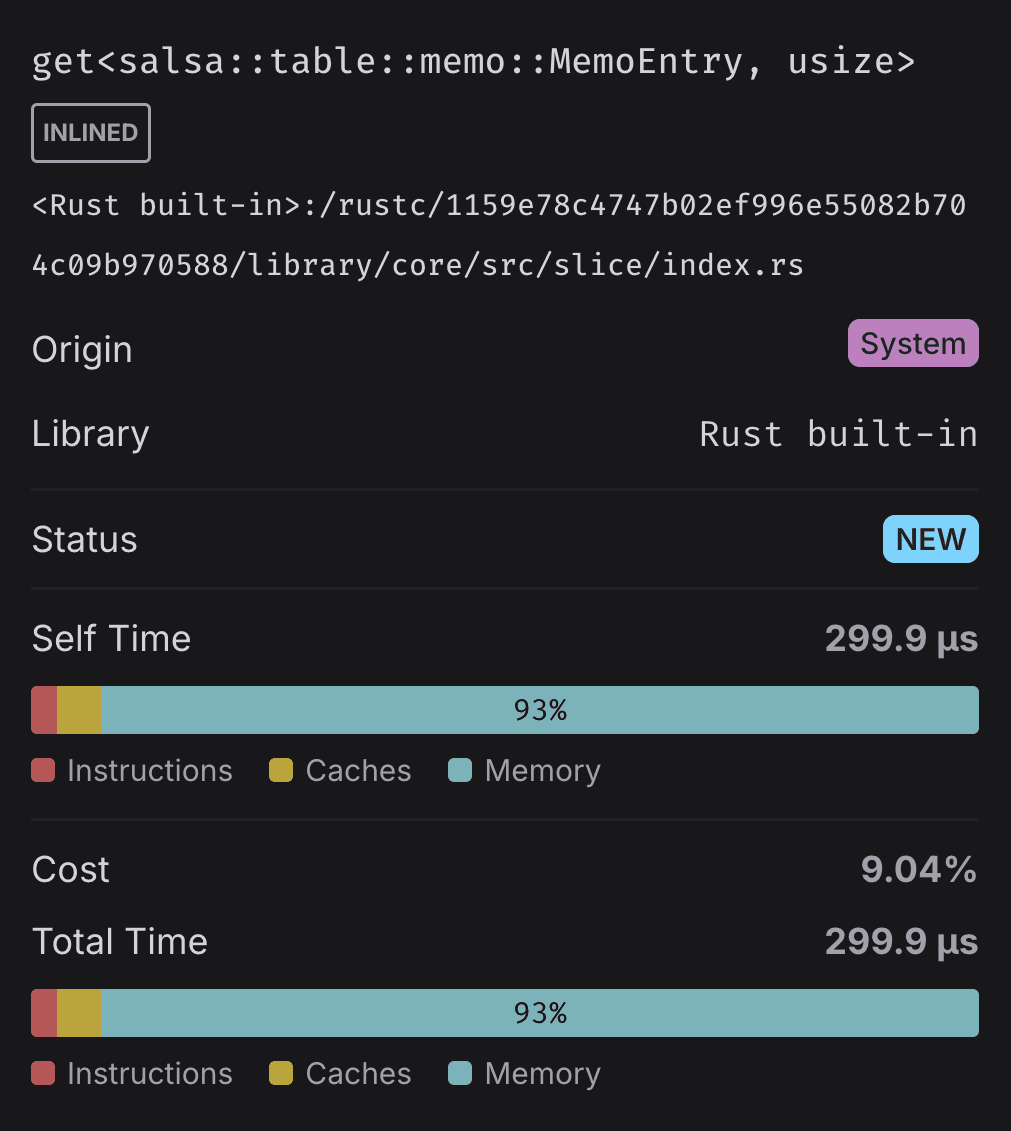
When you hover over a frame in the flamegraph, you'll see whether the frame was inlined, giving you complete visibility into both your code and compiler optimizations.
Get started
This feature is available with
CodSpeedHQ/action v4.3.1
and later. If you're using the @v4 shorthand, you're already good to go!
Otherwise, update your workflow to use @v4.3.1 or later.
Runs just got 2 minutes faster!
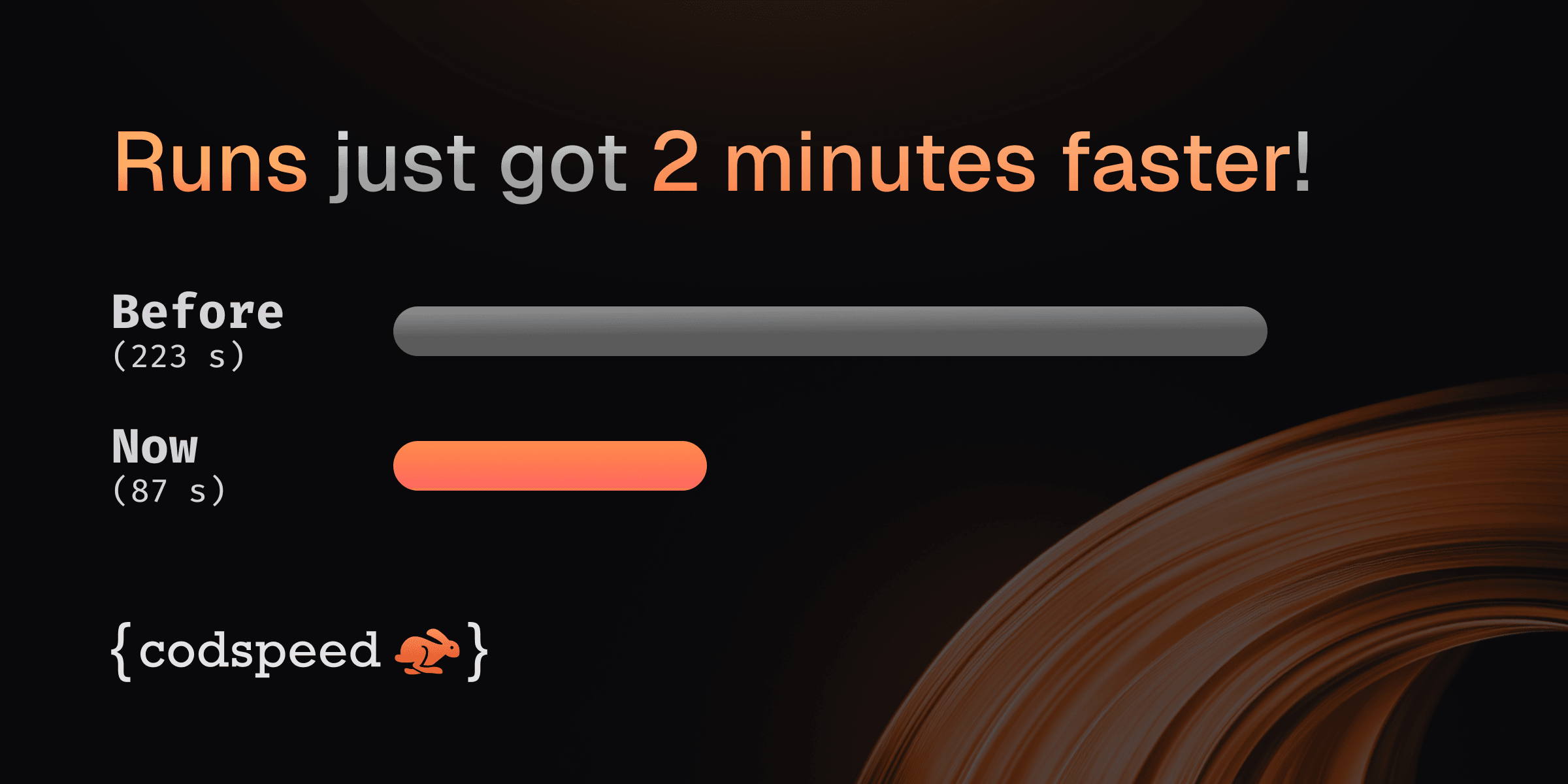
Upgrading to the latest
CodSpeedHQ/action release
enables caching of instrument installations (like valgrind or perf),
removing the per-run apt install overhead. In practice this cuts about 2
minutes off most CodSpeed Action runs.
If you're using the shorthand @v4 version of the action, you're already good
to go! Otherwise, just bump the action version to @v4.2.0 or later.
And voilà! 🎉 Your performance feedback loop just got 2 minutes faster.
How we got there?
A few weeks ago,
a tweet by Boshen, the
creator of oxc project, highlighted that the CodSpeed GitHub Action was taking 2
minutes just to install dependencies. His investigation revealed that most of
the time was spent working on man-db updates. Bypassing this made him already
save 80s from the installation time.
While this could be done by the CodSpeed action automatically, we don't feel comfortable changing the host machine behavior and we believe this should be done in the runner image directly.
Still, we realized that we could leverage the Github Actions cache to speed up even more this process, completely caching the APT installation of the dependencies.
This led us to go from 223.3 seconds to 87.4 seconds on a sample project. Effectively saving 136 seconds (more than 2 minutes) per run1.
If you're using CodSpeed Macro Runners, the instruments are already installed in the image so it's even more efficient.
Customizing the cache behavior
This new caching mechanism adds 2 action options to customize the behavior:
- uses: CodSpeedHQ/action@v4
  with:
    # ...

    # [OPTIONAL]
    # Enable caching of instrument installations (like valgrind or perf) to speed up
    # subsequent workflow runs. Set to 'false' to disable caching. Defaults to 'true'.
    cache-instruments: "true"

    # [OPTIONAL]
    # The directory to use for caching installations of instruments (like valgrind or perf).
    # This will speed up subsequent workflow runs by reusing previously installed instruments.
    # Defaults to $HOME/.cache/codspeed-action if not specified.
    instruments-cache-dir: ""
Learn more in the CodSpeedHQ/action repository.
Footnotes
Introducing Walltime Profiling Across Languages
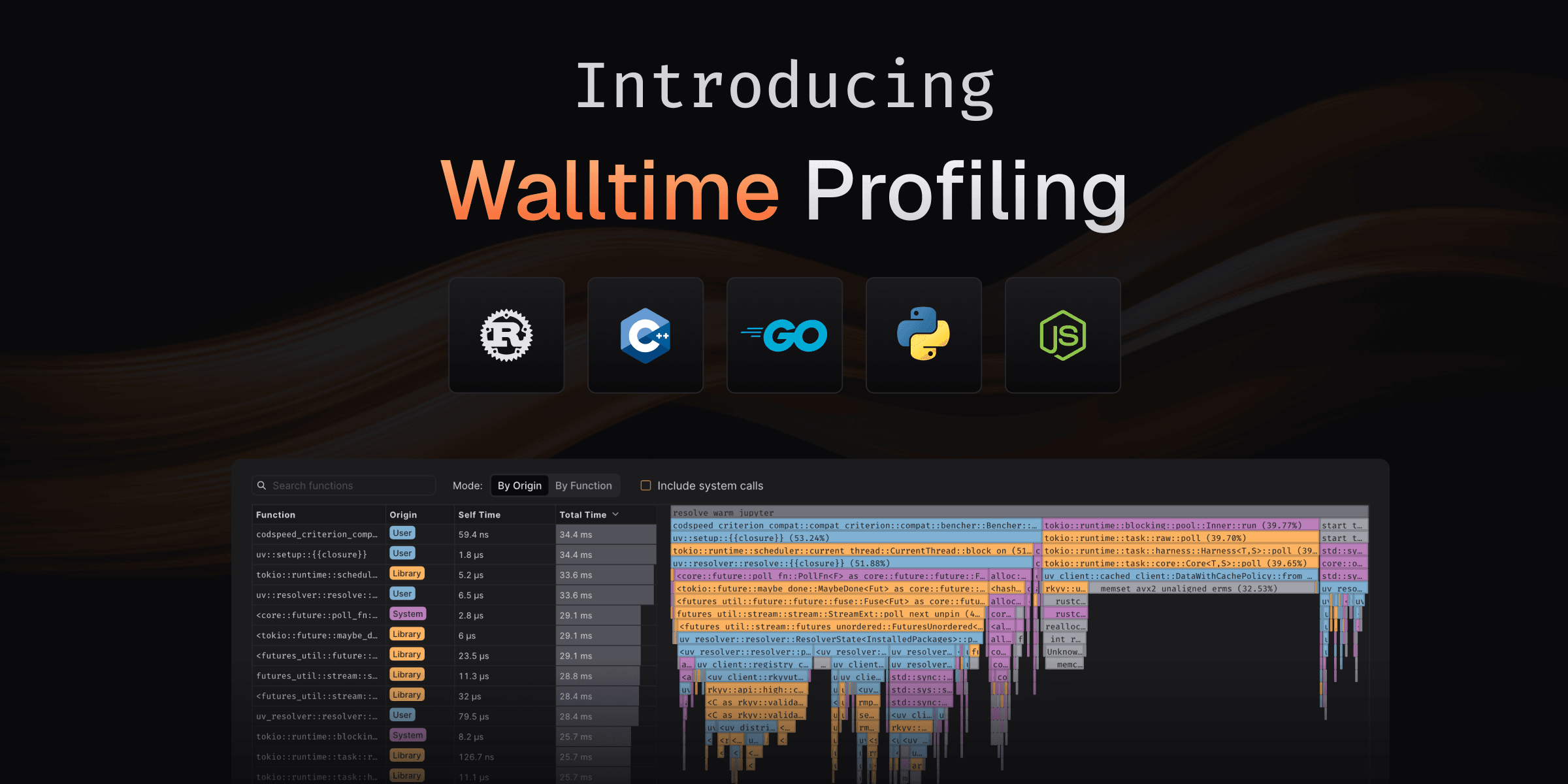
Walltime measurements now come with full profiling support, giving you detailed
flamegraphs to understand where your real-world performance bottlenecks are
coming from. Using perf under the hood, you can now profile not just CPU-bound
code but also I/O, network operations, and other system-level interactions.
This profiling support is now available by default for Rust, C/C++, Python, Go, and Node.js when using the Walltime instrument.
Why This Matters?
Until now, the Walltime instrument gave you the total execution time, essential for understanding real-world performance but finding the specific bottlenecks required additional tools. Now, you get both the measurement and the insights in one place.
Whether you're optimizing database queries, network requests, or file I/O, you can see exactly which functions are consuming time and make targeted improvements.
How It Works?
Walltime profiling uses perf to capture stack traces during benchmark
execution, building detailed flamegraphs that show:
- Function-level breakdowns
- Differential flamegraphs
- Origin identification (User, Library, System)
Learn more about profiling in our documentation.
No configuration changes needed—if you're already using Walltime, profiling data will automatically appear in your benchmark results.
For the best results, we recommend using the Walltime instrument on CodSpeed Macro Runners, bare metal instances optimized for performance measurement, making sure the profiles will be consistent across CI runs.
jobs:
  benchmarks:
    name: Run benchmarks
    runs-on: codspeed-macro
    steps:
      - uses: actions/checkout@v4
      # ...
      - name: Run benchmarks
        uses: CodSpeedHQ/action@v4
        with:
          mode: walltime
          run: "<your benchmark command>"
Learn more about the Walltime instrument and explore how profiling can help you optimize real-world performance!
Only bench what matters with Partial Runs
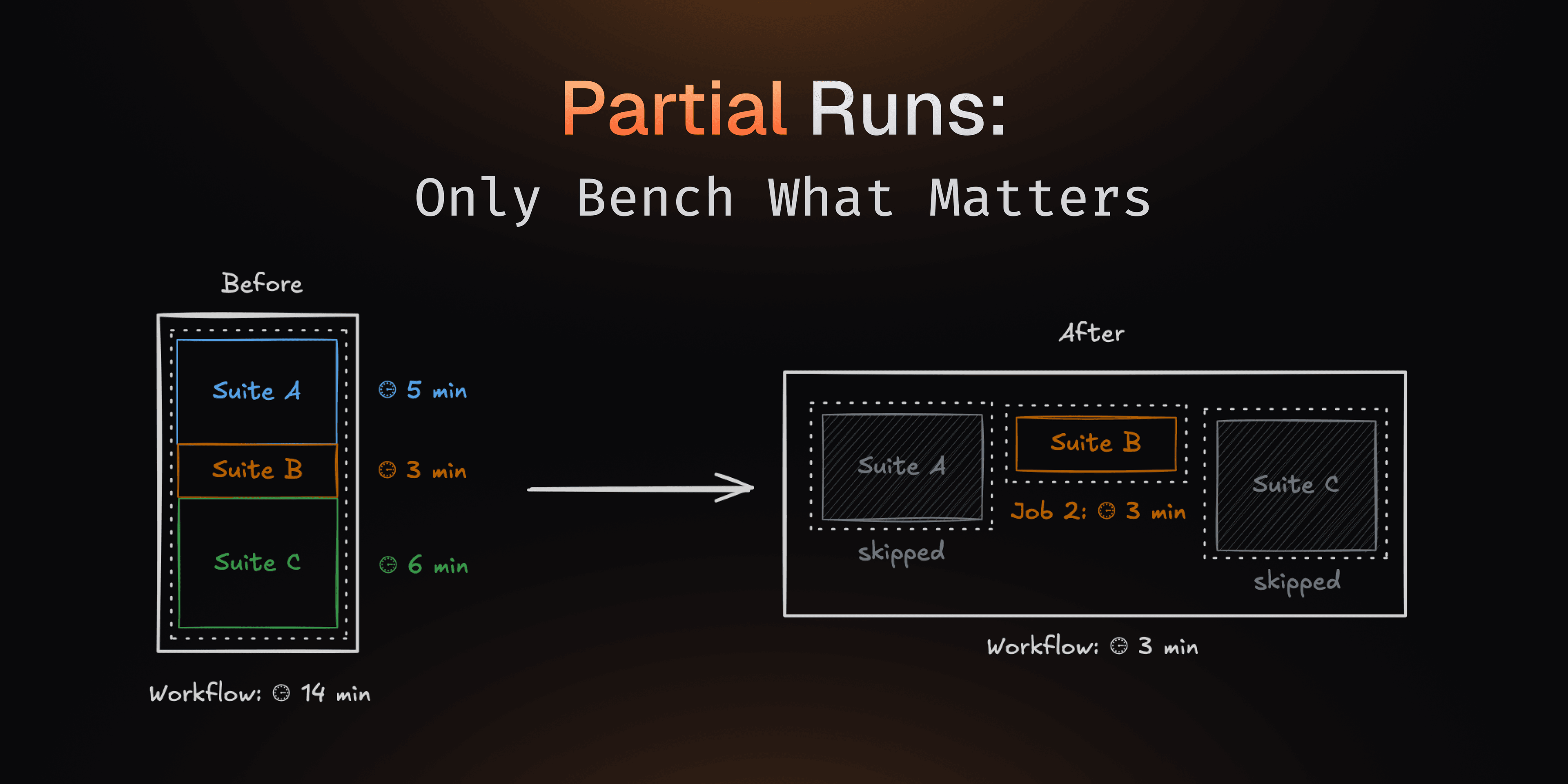
With your projects becoming larger, you might end up with long-running benchmark workflows, degrading the performance feedback loop and using a lot of resources in your CI.
Now you can solve this with Partial Runs and only run a subset of the benchmarks that are defined in your codebase.
For example you can only run benchmarks relevant to the code changes in a pull request, or run a subset of long-running benchmarks on a schedule.
Partial Runs
From now on, you can run only a subset of your benchmarks in a CI workflow. You will still keep a complete performance history of your codebase, since the benchmarks that are not run will be marked as "skipped" and use the results from the base run.
Handling removed benchmarks with Benchmark Archival
To keep your reports clean and relevant, you will now be able to archive benchmarks that were removed from your codebase.
When you remove a benchmark from your codebase and make a new commit, it will first be marked as "skipped" due to the Partial Runs feature. You can then archive it to remove it from from future reports, while still keeping its history for reference.
Learn more about Partial Runs and Benchmark Archival!
More Free Macro Runners minutes
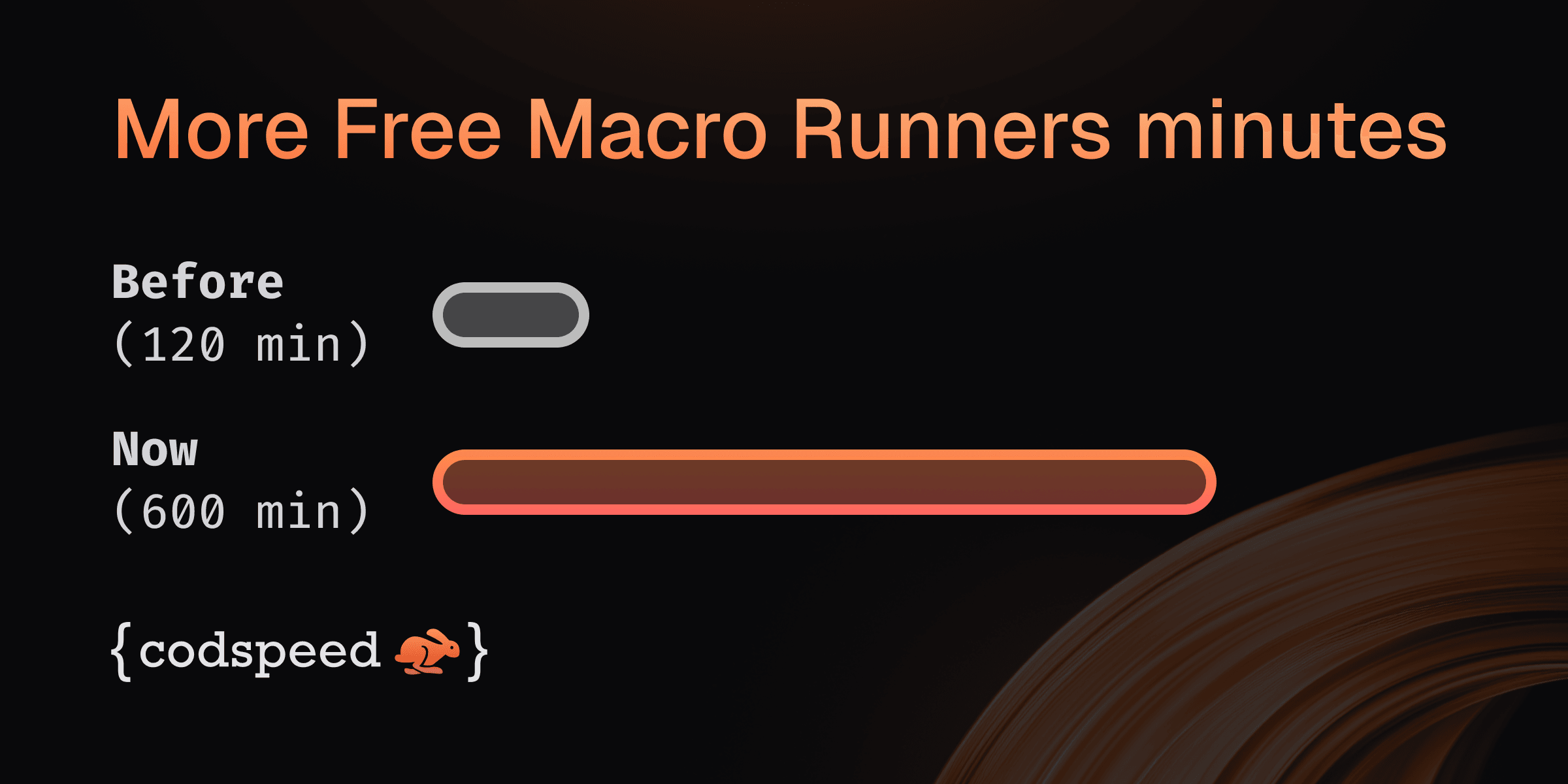
Starting today, every plan comes with 600 free macro runner minutes per month (previously 120) for the Walltime instrument. That's more room to run your benchmarks without worrying about hitting limits.
Open Source Boost
Working on an open source project? We'll happily grant even more minutes. Just send us a note with a few details about your repo.
👉 Create a free account and try it out, and check out our pricing for more information!
Go Support
You can now use CodSpeed to benchmark Go codebases with the standard
testing package and your existing go test
workflow! No code changes required!
The integration is available in our codspeed-go repository.
Quick Start
CodSpeed works with your regular go test -bench runs. Write benchmarks with
testing and CodSpeed will discover and run them.
Here is a simple example:
// fib_test.go
package example

import "testing"

func fib(n int) int {
  if n < 2 {
    return n
  }
  return fib(n-1) + fib(n-2)
}

func BenchmarkFibonacci10(b *testing.B) {
  // Preferred loop helper for precision
  for b.Loop() {
    fib(10)
  }
}

func BenchmarkFibonacci20(b *testing.B) {
  // Traditional pattern also supported
  for i := 0; i < b.N; i++ {
    fib(20)
  }
}
Check out our Go documentation for all details on how to get started!
Improved Profiling
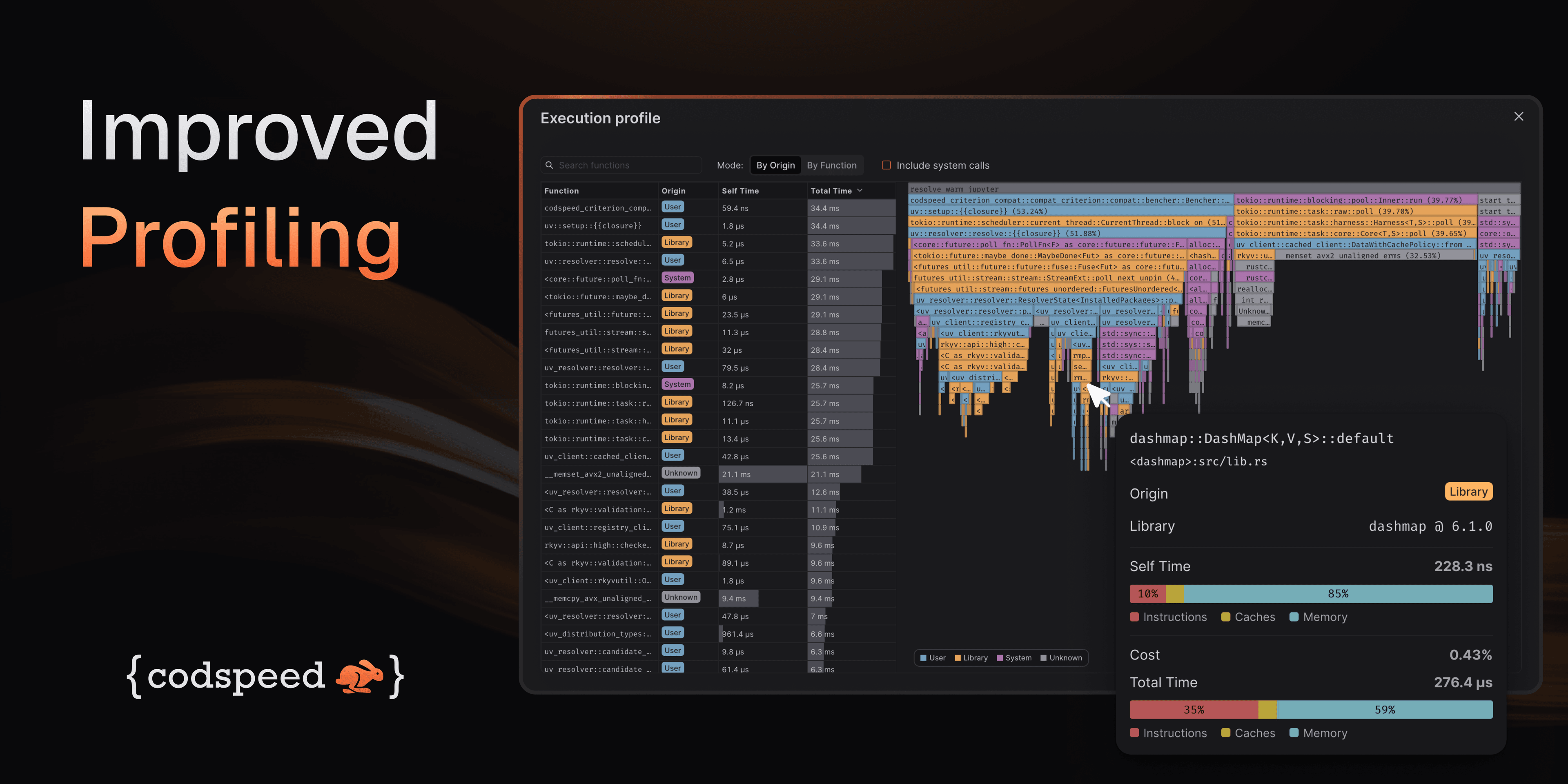
We've made a bunch of updates to make it much easier to understand where your performance issues come from and how to act on them. From identifying whether a span comes from your code or a dependency, to improving function visibility across runs, here's what's new!
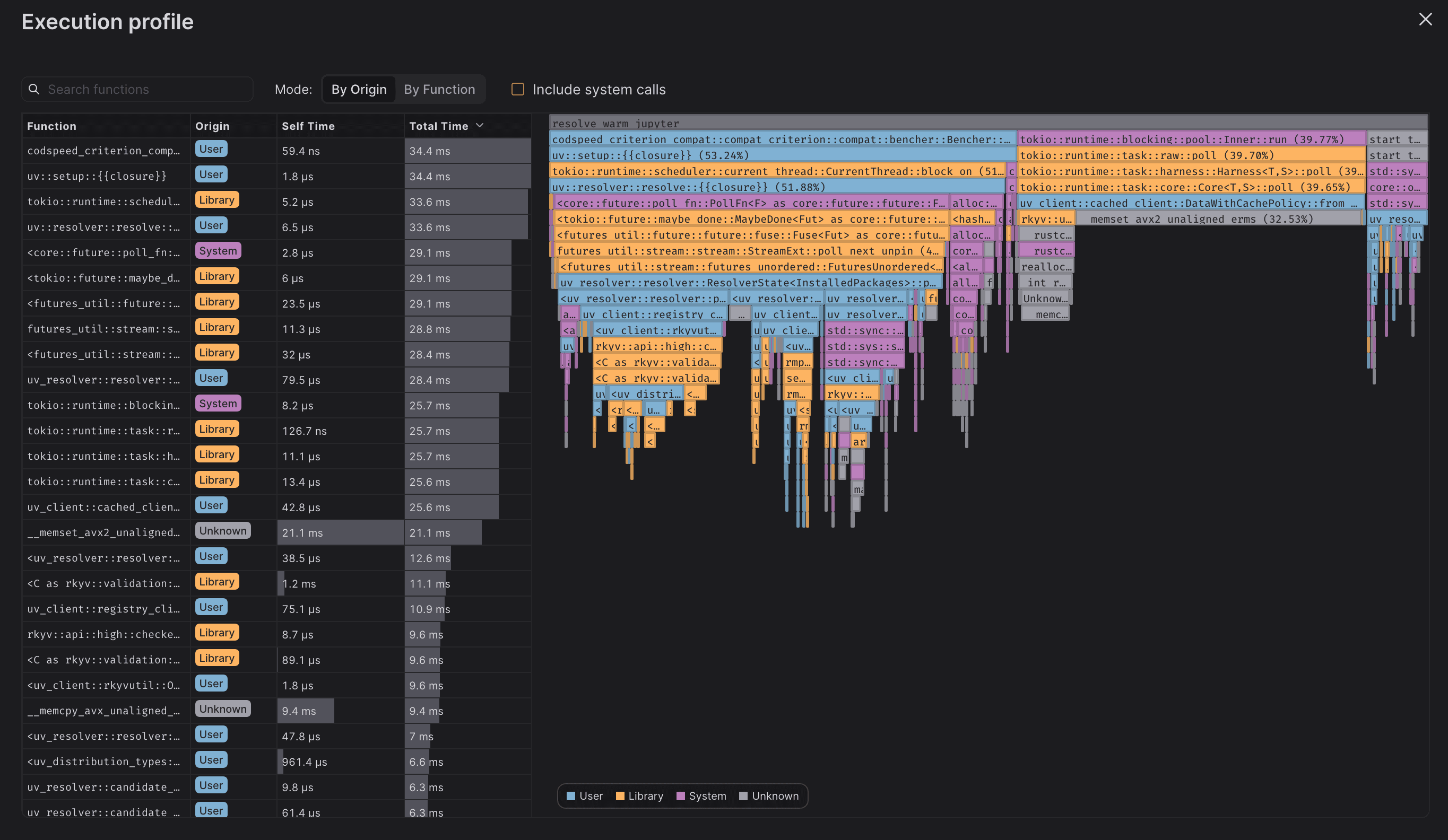
Function list and origin identification
We can now identify the origin of the code that generated the span, either if it's code written by you, a library, or the system/interpreter you're using. This is useful to quickly identify the source of the span without having to think wether or not you can optimize it directly.
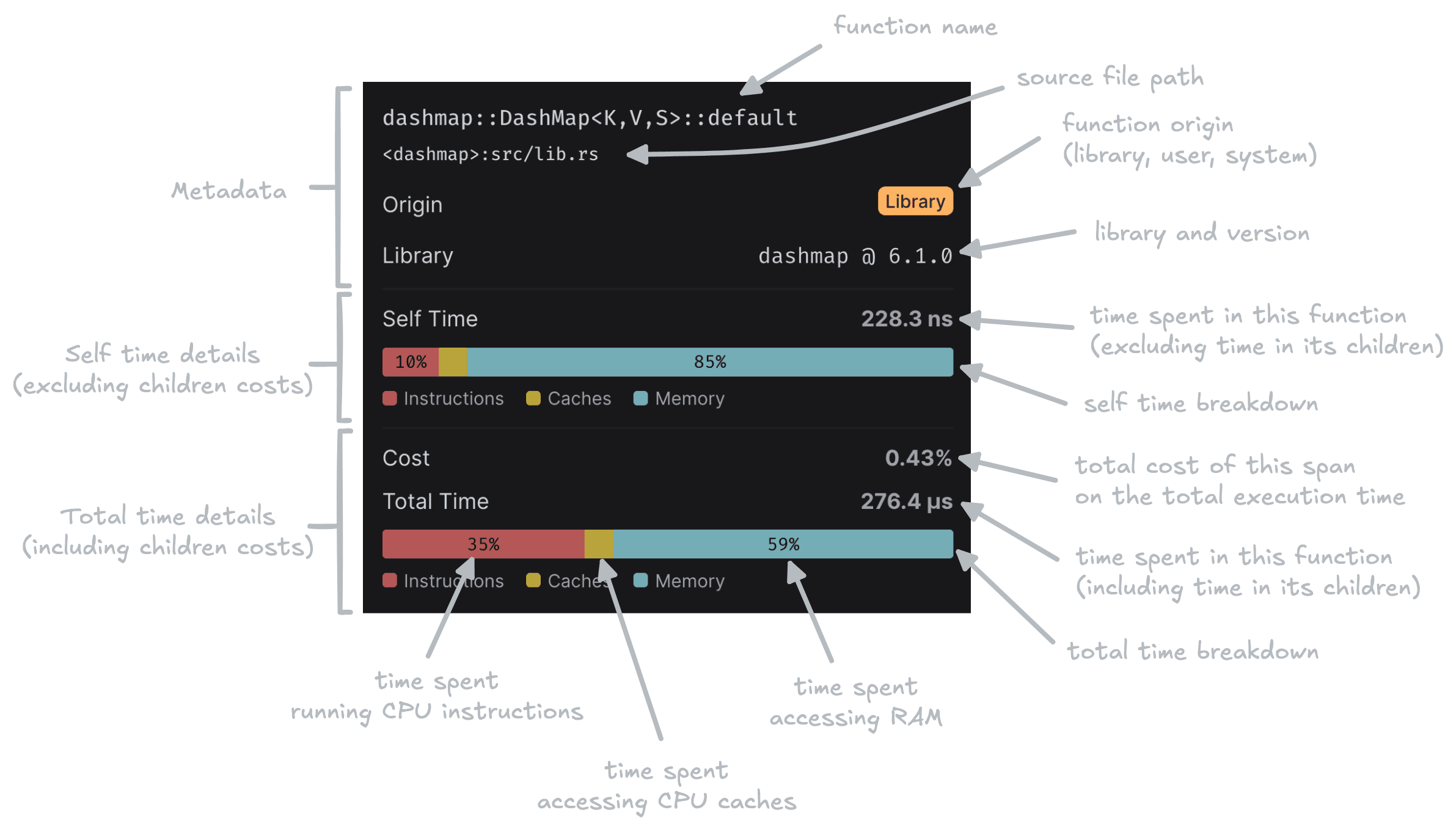
Granularity in span details
The span tooltip now displays the origin of the code that generated the span, and allocation breakdown of both the total and the self time. Making it easier to identify the bottlenecks within functions.
Coloring modes
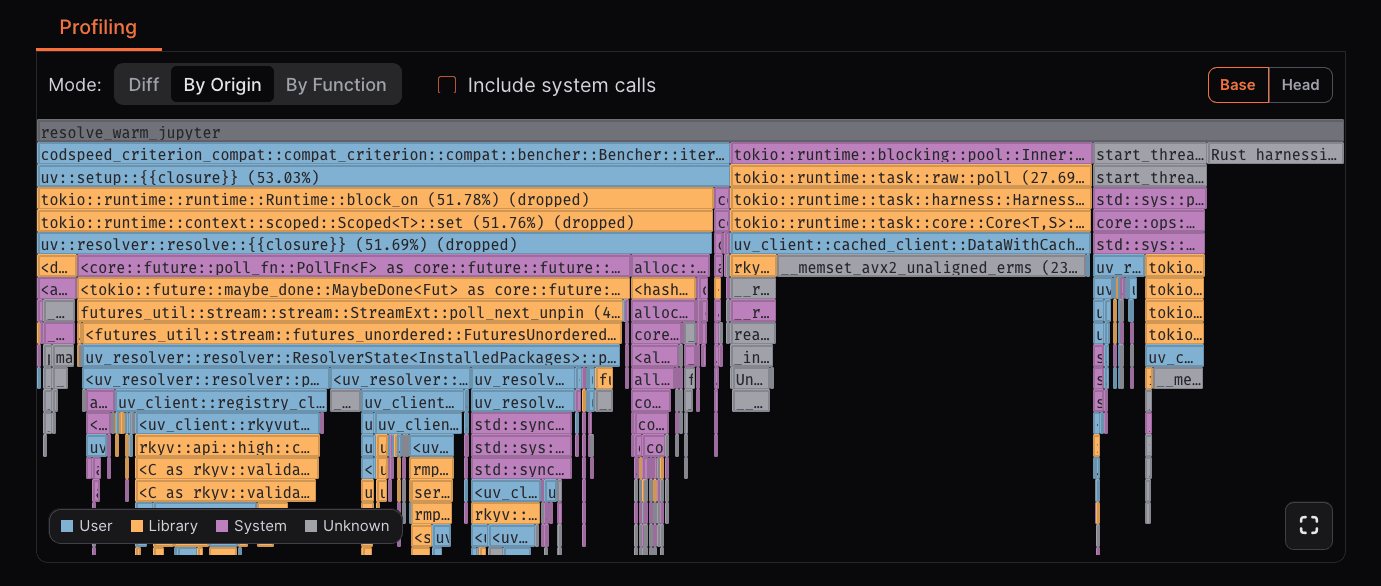
By Origin
We added a new By Origin coloring mode, which colors the flamegraph by the origin of the span. Properly separating User, Library, and System spans, making it easier to identify the source of the span.
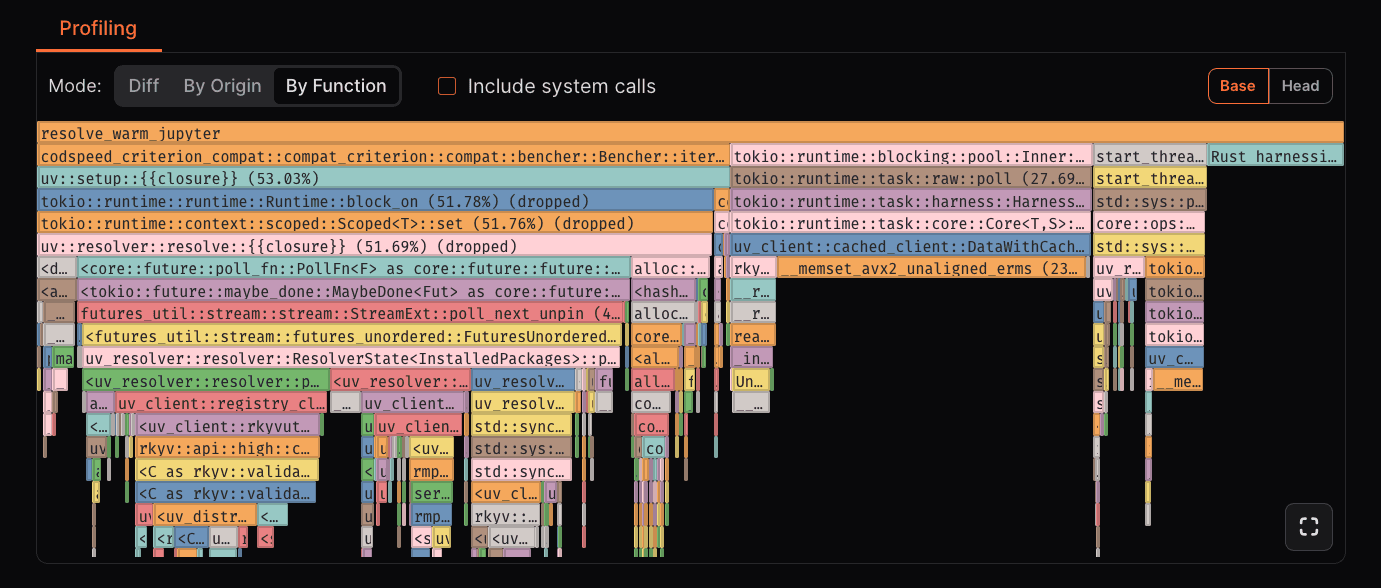
By Function
We improved the By Function coloring mode, now the color of the function is consistent across runs and CodSpeed projects, making it easier to identify the same function across different runs.
Diff
Differential profiling is still available, now as a coloring mode, and now supports displaying dropped frames.
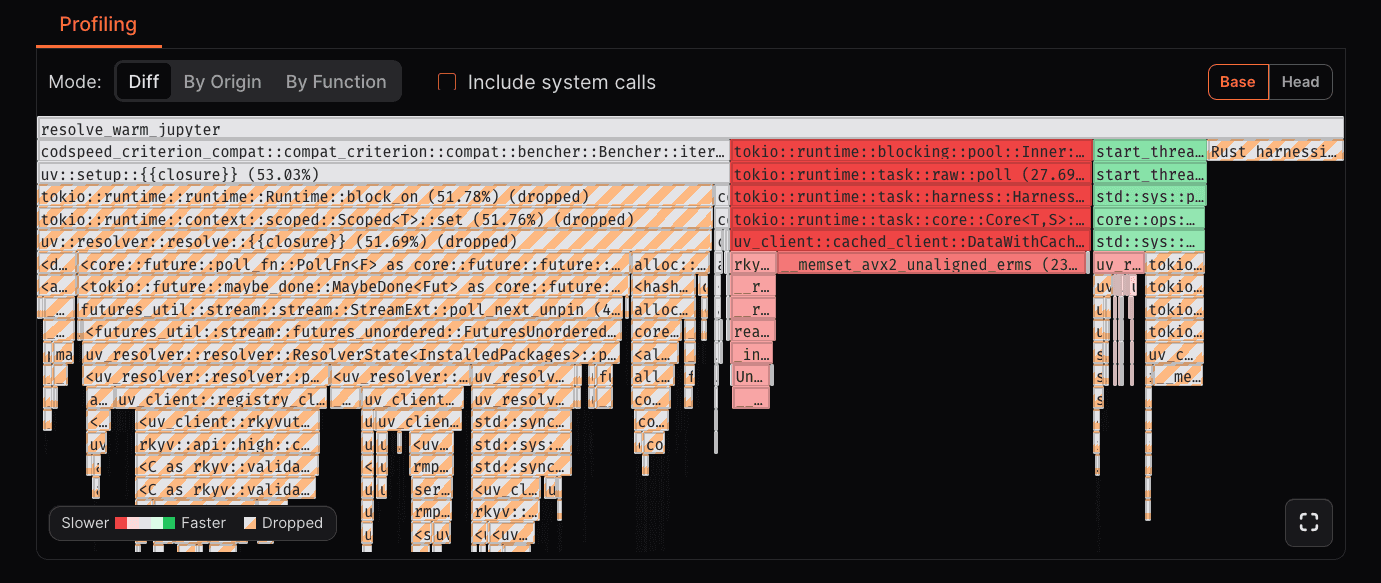
Misc
We also improved the root frame identification and now display all the root frames in the flamegraph allowing you to see more details and potentially multiple threads started before the measurement.
Introducing p99.chat: the assistant for software performance optimization
We're excited to introduce p99.chat, an AI-powered performance analysis assistant, simplifying how to approach software optimization!
Performance troubleshooting traditionally requires juggling multiple tools, including sampling profilers, instrumentation, benchmarks, and visualizations, as well as manually connecting them to your codebase. Each tool has its own setup requirements, data formats, and workflow, which can turn what should be rapid iteration into hours of configuration. You spend more time wrestling with toolchains than actually optimizing code.
p99 eliminates this friction by providing an integrated chat interface that handles code analysis, instrumentation, and visualization in one seamless experience. Instead of context-switching between tools, you describe your performance challenge, and p99 orchestrates the entire analysis pipeline.
Share your code and performance goals. p99 will analyze, instrument, and visualize the results, cutting the traditional setup overhead down to seconds.
Check it out this chat here!
What can it do?
- Write and optimize algorithms in Python and Rust
- Execute and profile code using CodSpeed's CPU Instrumentation
- Generate performance visualizations, including flamegraphs and charts
- Compare algorithm performance
What's coming next?
- MCP integration: Seamlessly connect p99 with your code editor for real-time performance optimization
- More instruments: Memory profiling, walltime analysis, static analysis, and GPU profiling
- GitHub integration: Reference code directly from repositories within the chat
- Automated pull requests: Persist improvements and benchmarks with continuous performance monitoring
- Expanded language support: More runtime environments and analysis capabilities
How to get started?
p99 is now globally available and completely free to use. Try it now at p99.chat!
First Class Bazel Support for C++
You can now use CodSpeed with Bazel build systems thanks to our enhanced C++ integration!
This addition complements our existing CMake support, making it easier to benchmark large-scale C++ projects with complex build configurations. Bazel support is particularly valuable for enterprise teams working with monorepos and sophisticated dependency management.
Quick Start
Add CodSpeed to your Bazel workspace by adding this to your WORKSPACE file:
load("@bazel_tools//tools/build_defs/repo:http.bzl", "http_archive")

http_archive(
    name = "codspeed_cpp",
    urls = ["https://github.com/CodSpeedHQ/codspeed-cpp/archive/refs/heads/main.zip"],
    strip_prefix = "codspeed-cpp-main",
)
Then define your benchmark target in your package's BUILD.bazel file:
cc_binary(
    name = "my_benchmark",
    srcs = glob(["*.cpp", "*.hpp"]),
    deps = [
        "@codspeed_cpp//google_benchmark:benchmark",
    ],
)
Running Benchmarks
Build and run your benchmarks with the CodSpeed instrumentation flag:
# Build your benchmark
bazel build //path/to/bench:my_benchmark --@codspeed_cpp//core:codspeed_mode=instrumentation

# Run it locally
bazel run //path/to/bench:my_benchmark --@codspeed_cpp//core:codspeed_mode=instrumentation
For more information, check out the Bazel section of C++ documentation.
C++ Support
You can now use CodSpeed to benchmark C++ codebases thanks to our new integration with google/benchmark`.
Quick Start
CodSpeed's C++ support works out of the box with CMake:
# Fetch the CodSpeed compatibility layer
FetchContent_Declare(
    google_benchmark
    GIT_REPOSITORY https://github.com/CodSpeedHQ/codspeed-cpp
    SOURCE_SUBDIR google_benchmark
    GIT_TAG main # Or chose a specific version or git ref
)
FetchContent_MakeAvailable(google_benchmark)

# Declare your benchmark executable and its sources here
add_executable(bench_fibo benches/fibo.cpp)

# Link your executable against the `benchmark::benchmark`
target_link_libraries(bench_fibo benchmark::benchmark)
You can then write your benchmarks in C++ using the google/benchmark API.
Here's an example:
#include <benchmark/benchmark.h>

static void BM_Fib(benchmark::State& state) {
  auto fib = [](int n) {
    return n < 2 ? n : fib(n - 1) + fib(n - 2);
  };

  for (auto _ : state)
    benchmark::DoNotOptimize(fib(10));
}

BENCHMARK(BM_Fib);
BENCHMARK_MAIN();
This can then run both locally and in CI environments using the CodSpeed Runner. Check out the documentation on integrating the runner in CI environments.
Real World Examples
Here are a few example repositories of real-world C++ projects:
- boost-benches: a collection of benchmarks for the Boost C++ Libraries
- opencv-benches: a collection of benchmarks for the OpenCV library
Check out our C++ documentation for more details.
Free Plan and Macro Runners Now Globally Available

We understand that performance matters for teams of all sizes—from indie developers and startups to large enterprises. Yet, traditional performance monitoring tools can be prohibitively expensive, creating a barrier for smaller teams and open-source projects. Today, we're breaking down those barriers with two new features that bring enterprise-grade performance insights within reach of every developer.
Free Plan for Private Repositories
Now, small teams can leverage powerful performance insights without breaking the bank. Our new Free plan allows:
- Up to 5 users
- Unlimited private repositories
- 3-month performance history
- CI integration
- Pull-Request performance reports and checks
- 120 free macro runner minutes per month
Macro Runners Now Globally Available
We're rolling out our high-performance benchmark runners worldwide. Every user and organization now gets:
- 120 free macro runner minutes per month
- Macro Runners instances with:
- Bare-metal 16-core ARM64 CPUs
- 32 GB RAM
- Isolated machines to minimize environmental noise
- Optimized for consistency and performance measurement
These macro runners can be used along with our Walltime instruments to measure the absolute performance of your code. After the initial free minutes, you can continue using macro runners with flexible, usage-based pricing that grows with your needs.
These improvements ensure that even teams with limited resources can make data-driven optimization decisions.
Get started with your free account today or learn more about our pricing.
Faster Workflows with Sharded Benchmarks
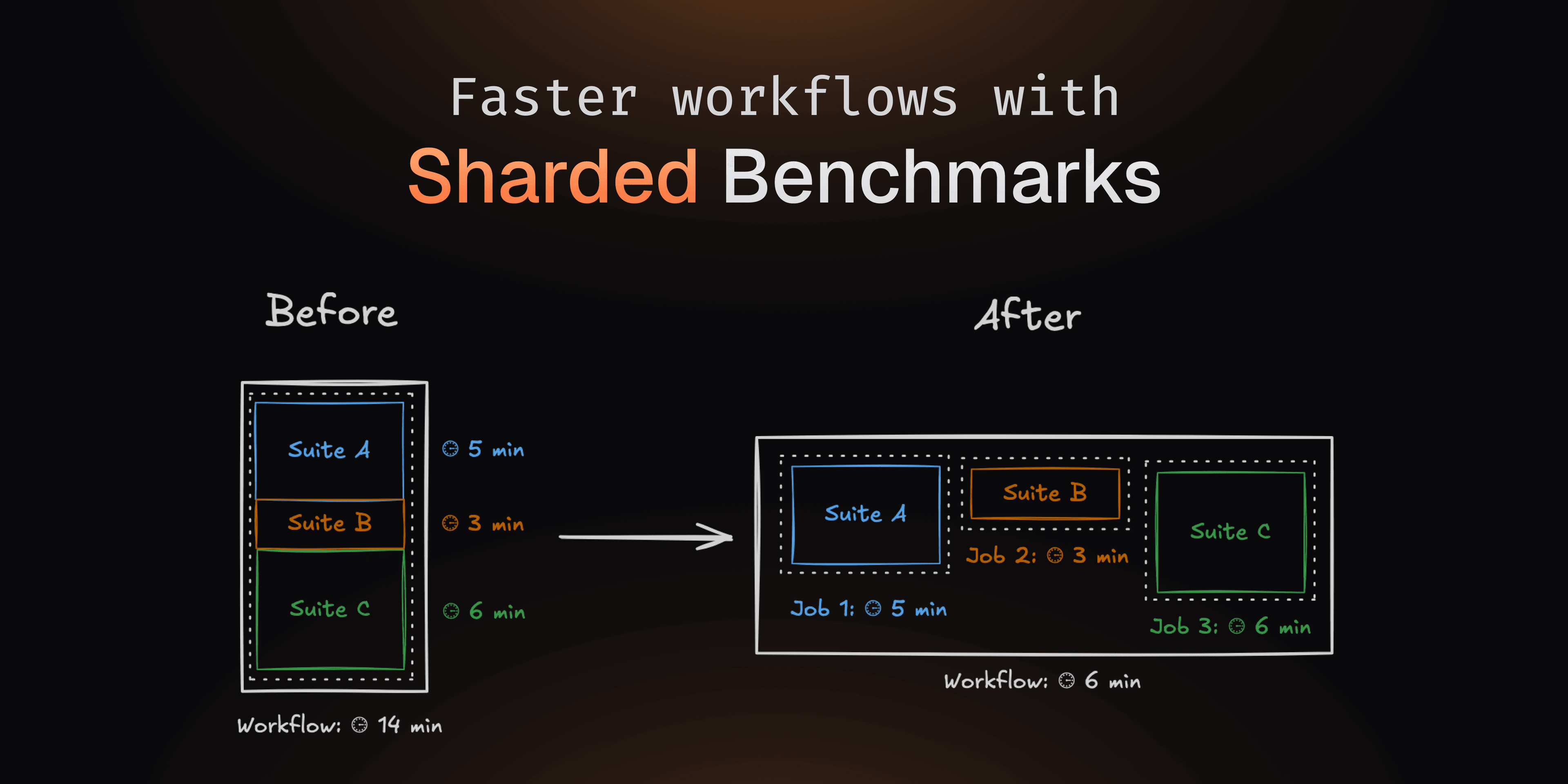
Running benchmarks can be slow and significantly impact your CI time. You can now split your benchmark suite across multiple jobs in the same CI workflow, reducing execution time by running them in parallel.
When running heavy benchmark suites, this can divide the total runtime by the number of jobs, dramatically speeding up your CI pipeline. CodSpeed then aggregates the results into a single report, ensuring accurate performance tracking.
For example, using pytest:
# .github/workflows/codspeed.yml

jobs:
  benchmarks:
    strategy:
      matrix:
        shard: [1, 2, 3, 4]

    name: "Run benchmarks (Shard #${{ matrix.shard }})"
    runs-on: ubuntu-latest
    steps:
      - uses: actions/checkout@v4
      - uses: actions/setup-python@v2
        with:
          python-version: 3.12.8
      - run: pip install -r requirements.txt
      - name: Run benchmarks
        uses: CodSpeedHQ/action@v3
        with:
          run:
            pytest tests/ --test-group=${{ matrix.shard }} --test-group-count=4
          token: ${{ secrets.CODSPEED_TOKEN }}
Learn more about benchmark sharding and how to integrate it in your CI.
Multi-language Support
With benchmarks written in several languages, it can be difficult to get a unified performance overview of your project.
You can now run benchmarks written in multiple languages. When run in the same CI workflow, CodSpeed will aggregate the results of these benchmarks into a single report.
For example, using pytest and vitest:
# .github/workflows/codspeed.yml

jobs:
  python-benchmarks:
    name: "Run Python benchmarks"
    runs-on: ubuntu-latest
    steps:
      - uses: actions/checkout@v4
      - name: Install required-version defined in uv.toml
        uses: astral-sh/setup-uv@v5
      - uses: actions/setup-python@v2
        with:
          python-version: 3.12.8
      - name: Run benchmarks
        uses: CodSpeedHQ/action@v3
        with:
          run: uv run pytest tests/benchmarks/ --codspeed
          token: ${{ secrets.CODSPEED_TOKEN }}

  nodejs-benchmarks:
    name: "Run NodeJS benchmarks"
    runs-on: ubuntu-latest
    steps:
      - uses: actions/checkout@v4
      - uses: "actions/setup-node@v3"
      - name: Install dependencies
        run: npm install
      - name: Run benchmarks
        uses: CodSpeedHQ/action@v3
        with:
          run: npm exec vitest bench
          token: ${{ secrets.CODSPEED_TOKEN }}
Learn more about multi-language support.
Divan Support for Rust
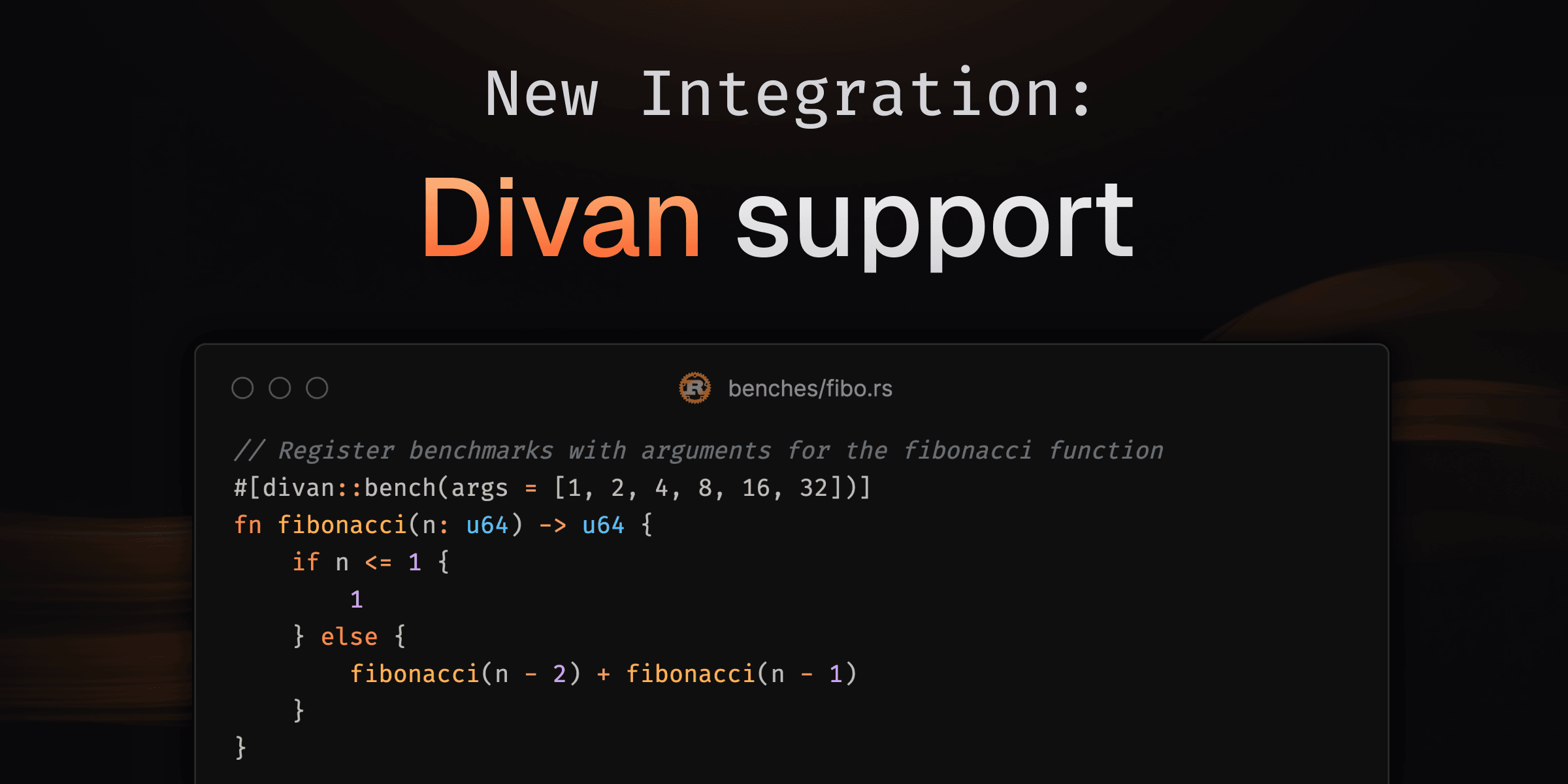
We're excited to announce a new Rust integration with Divan 🛋️, a fast and simple benchmarking framework! 🚀
Divan offers a straightforward API that simplifies the benchmarking process, allowing you to register benchmarks with ease. Unlike Criterion.rs, which can be more complex, or Bencher, which is less feature-rich, Divan provides a balanced approach with its user-friendly interface and powerful capabilities.
Here's an example of how you can use Divan to benchmark a function:
/// benches/fibonacci.rs

fn main() {
    // Run registered benchmarks.
    divan::main();
}

// Register a `fibonacci` function and benchmark it over multiple cases.
#[divan::bench(args = [1, 2, 4, 8, 16, 32])]
fn fibonacci(n: u64) -> u64 {
    if n <= 1 {
        1
    } else {
        fibonacci(n - 2) + fibonacci(n - 1)
    }
}
The divan::bench macro brings a very idiomatic and easy-to-use way to define
and customize benchmarks. Bringing this closer to standard test definition while
we're waiting on
custom test frameworks to be
stabilized.
Try it now by checking out our integration guide in the documentation to get started with using Divan in your Rust projects.
Improvements of the Benchmark and Branch pages
We released several improvements to the benchmark dashboard and branch pages.
Benchmark history graph
The performance of the benchmark history graph has been greatly improved. This improvement will be largely noticeable in projects with large histories. The vertical axis is now updated when zooming in on the graph, making it easier to see localized changes.
See it in action handling more than 15k data points:
Analyzing the results of a benchmark from the oxc
project
Share a link to a specific benchmark
You can now copy a link to a specific benchmark from a Pull Request, a Run, or a custom comparison view. This link will take you directly to the benchmark within the report.
Here is an example:
Profiling data in the benchmark dashboard
On the benchmark dashboard, you can now see the benchmark flame graph, computed from the latest run on the default branch.
Advent of CodSpeed

We're excited to announce the launch of CodSpeed's Advent Calendar, a performance-focused coding challenge based on the popular Advent of Code problems! 🎄
The challenge
-
Compete for Speed: Solve daily problems from Advent of Code and optimize for performance in Rust
-
Prizes: Stand a chance to win incredible prizes, including:
- 🏆 MacBook Air
- 🎮 Nintendo Switch
- 🎧 Noise-canceling headphones
- ⌨️ Mechanical keyboard
- 🔊 JBL Flip 6
- 💸 Steam gift cards
-
Leaderboard: Track your ranking as you climb to the top of this exciting global competition.
How to participate?
- Write the fastest algorithms in Rust.
- Submit your solutions via our GitHub repository
- Earn points daily and aim for the top prizes!
Find more details on the Advent of CodSpeed page.
👾 Join our Discord to connect with other participants and stay updated.
Happy coding and may the fastest Rustacean win! 🦀✨
Compare Any Runs
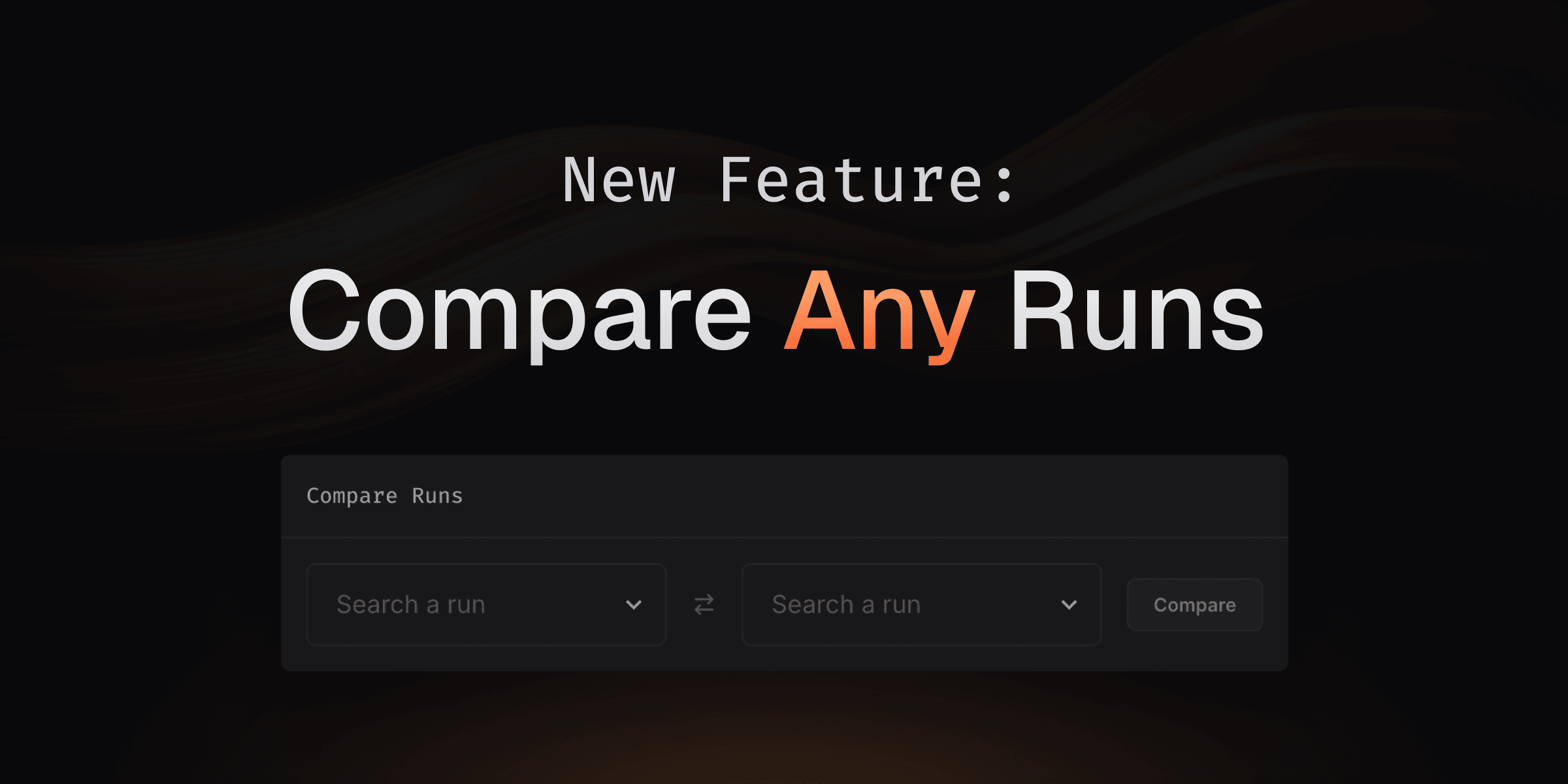
Until now, CodSpeed allowed you to compare runs only in specific scenarios—either through pull requests comparing branches with their base or comparing consecutive commits on a single branch.
With this new feature, you can now compare any runs: on arbitrary commits or branches, and also local runs made with the CLI.
Want to try it out? Just head to the "Runs" tab of a project (you can find a few of them here) and select the runs you want to compare!
Comparing astral-sh/ruff versions 0.7.4 and 0.8.1. Check it out
here!
What's Next? 🚀
Soon, we'll be adding the ability to compare tags directly, making it even simpler to compare runs across different versions of your project. Stay tuned for more updates!
Walltime Instrument and Macro Runners
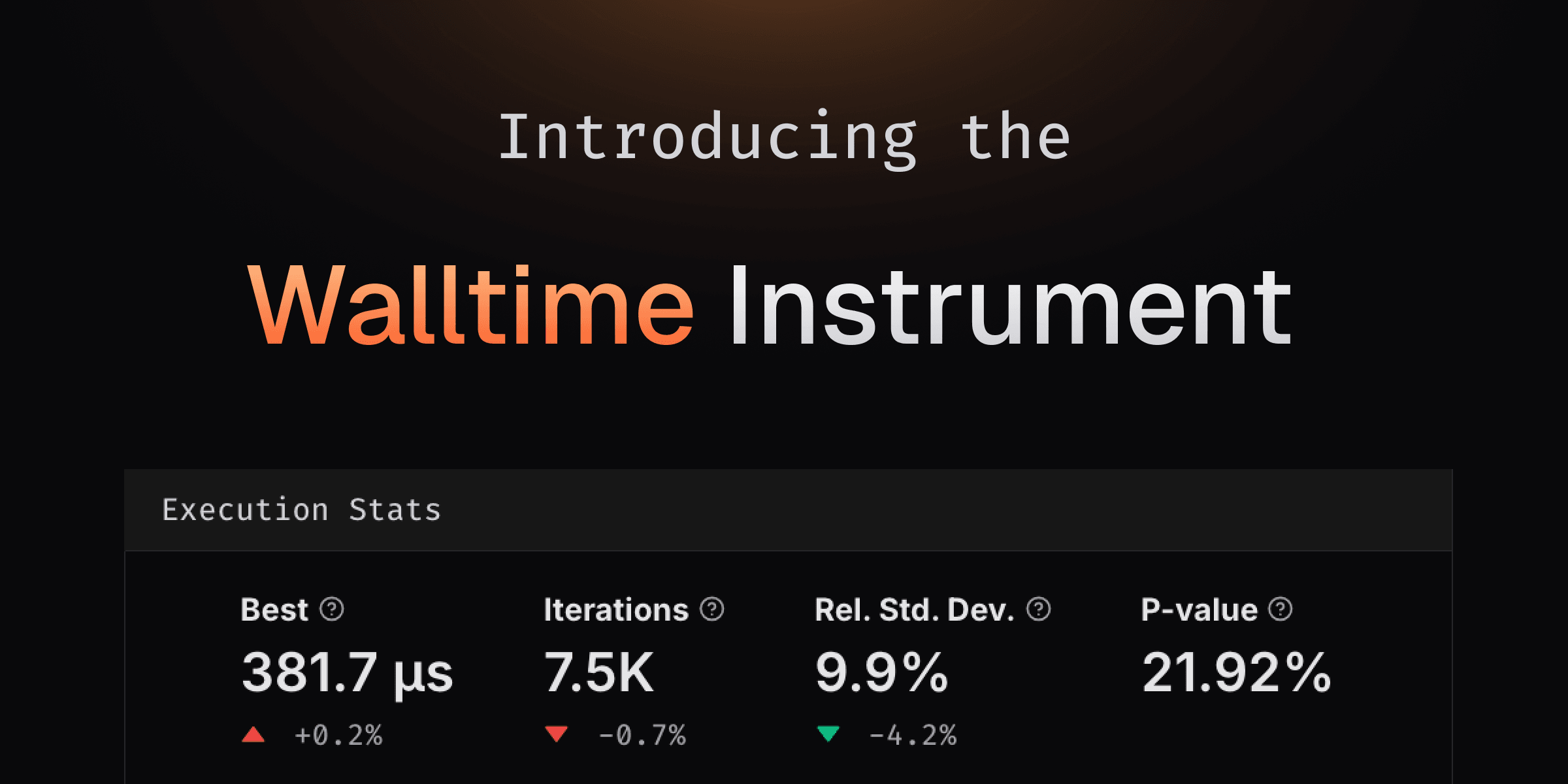
We're thrilled to unveil Walltime, a groundbreaking addition to CodSpeed's suite of instruments! 🎉 This new tool measures the wall time of your benchmarks—the total time elapsed from start to finish, capturing not just execution but also waiting on resources like I/O, network, or other processes.
At first glance, this might seem like a shift from our core philosophy of making benchmarks as deterministic as possible. But here's the thing: real-world performance often depends on the messy, noisy details of resource contention and latency. Walltime offers a lens into these real-world scenarios, making it an invaluable tool for system-level insights—without losing sight of the precision you trust CodSpeed to deliver.
Even as we introduce this new instrument, we remain committed to bringing consistent and reproducible results. That's why Walltime is exclusively available on CodSpeed Macro Runners. These hosted bare-metal runners are purpose-built for macro benchmarks, running in isolation to minimize environmental noise. This means you get realistic performance data without unnecessary interference.
Getting Started
Running Walltime measurements is as simple as changing the execution runner to
codspeed-macro in GitHub Actions. Here's an example of how to do it:
jobs:
  benchmarks:
    name: Run benchmarks
    runs-on: ubuntu-latest
    runs-on: codspeed-macro
    steps:
      - uses: actions/checkout@v4
      # ...
      - name: Run benchmarks
        uses: CodSpeedHQ/action@v3
        with:
          token: ${{ secrets.CODSPEED_TOKEN }}
          run: "<Insert your benchmark command here>"
Once set up, your Walltime results will shine in the CodSpeed dashboard:
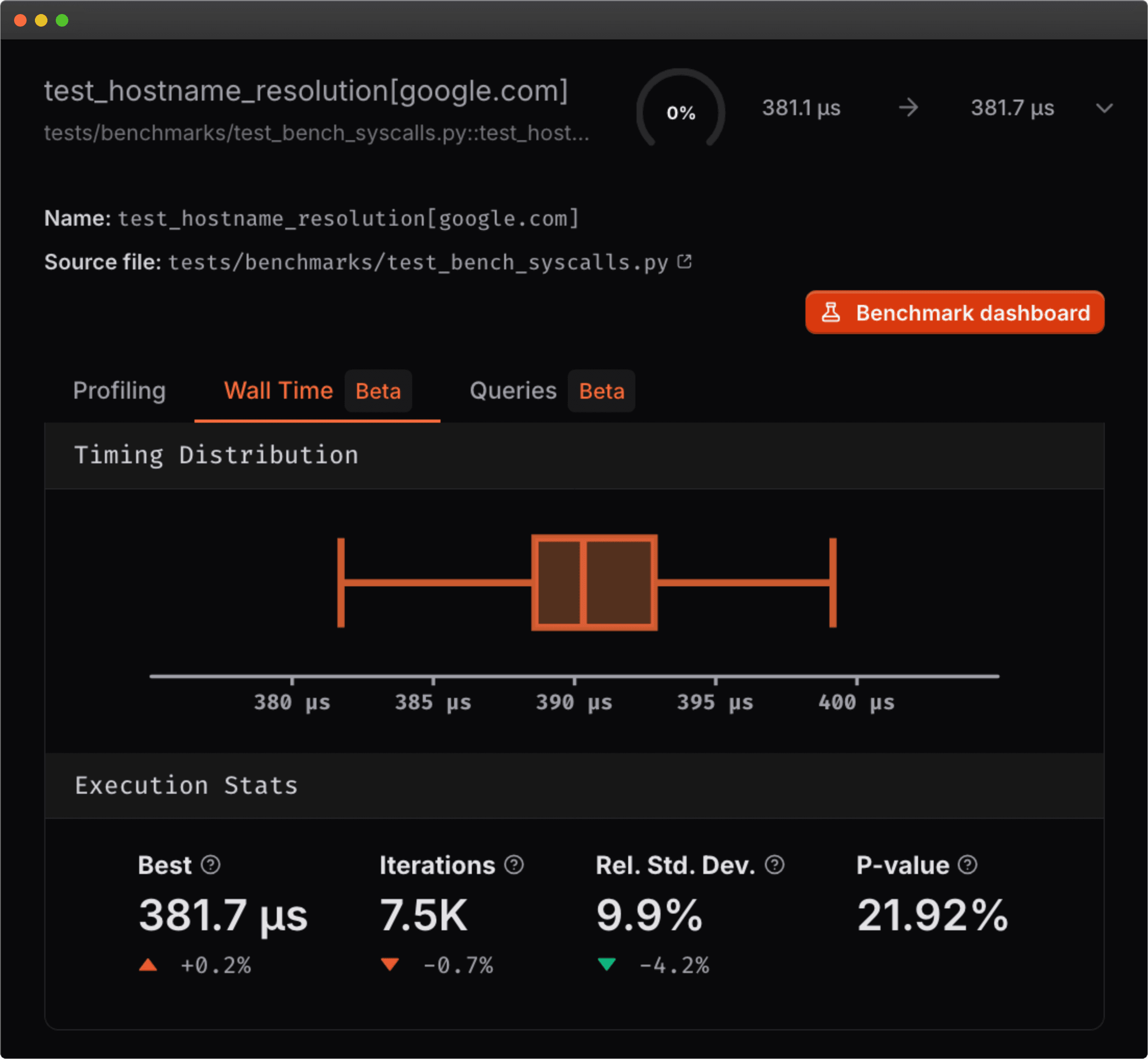
An example measuring the time taken to resolve the google.com hostname.
For a deeper dive into the Walltime instrument and Macro Runners, check out our documentation.
Join the Beta
This feature is still in closed beta, but if you're interested in trying it out, please reach out to us on Discord or by email at support@codspeed.io.
GitLab Integration
After a lot of work, we are happy to announce that CodSpeed now supports GitLab Cloud repositories and organizations as well as GitLab CI/CD runs!
Read our docs on setting up a GitLab integration and more details on setting up GitLab CI/CD with CodSpeed.
We'll soon also start supporting self-hosted GitLab instances on the Enterprise plan, so if you have one and are interested in trying it out, please reach out to us by email or on Discord!
We're Going Dark
We’re thrilled to announce the arrival of our dark theme, designed to enhance your experience, especially during those late-night coding or benchmarking sessions!
Customize Default Branch For Analysis
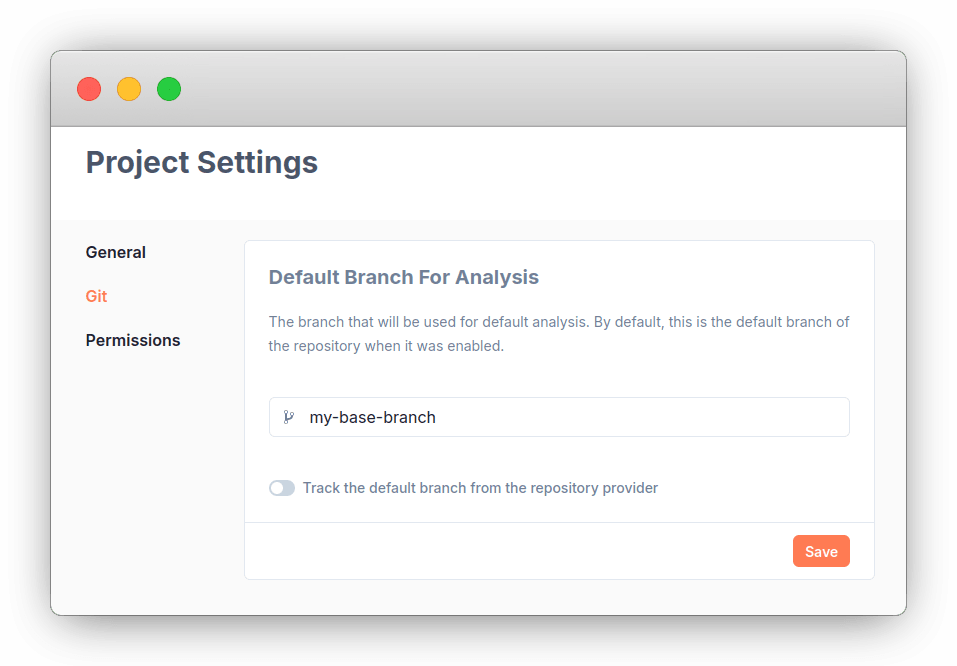
It is now possible to specify the default base branch for analysis of a repository. It no longer has to be the default branch set on the repository provider.
Add this changelog

This changelog will allow us to keep you updated with the latest features we implement! 🚀
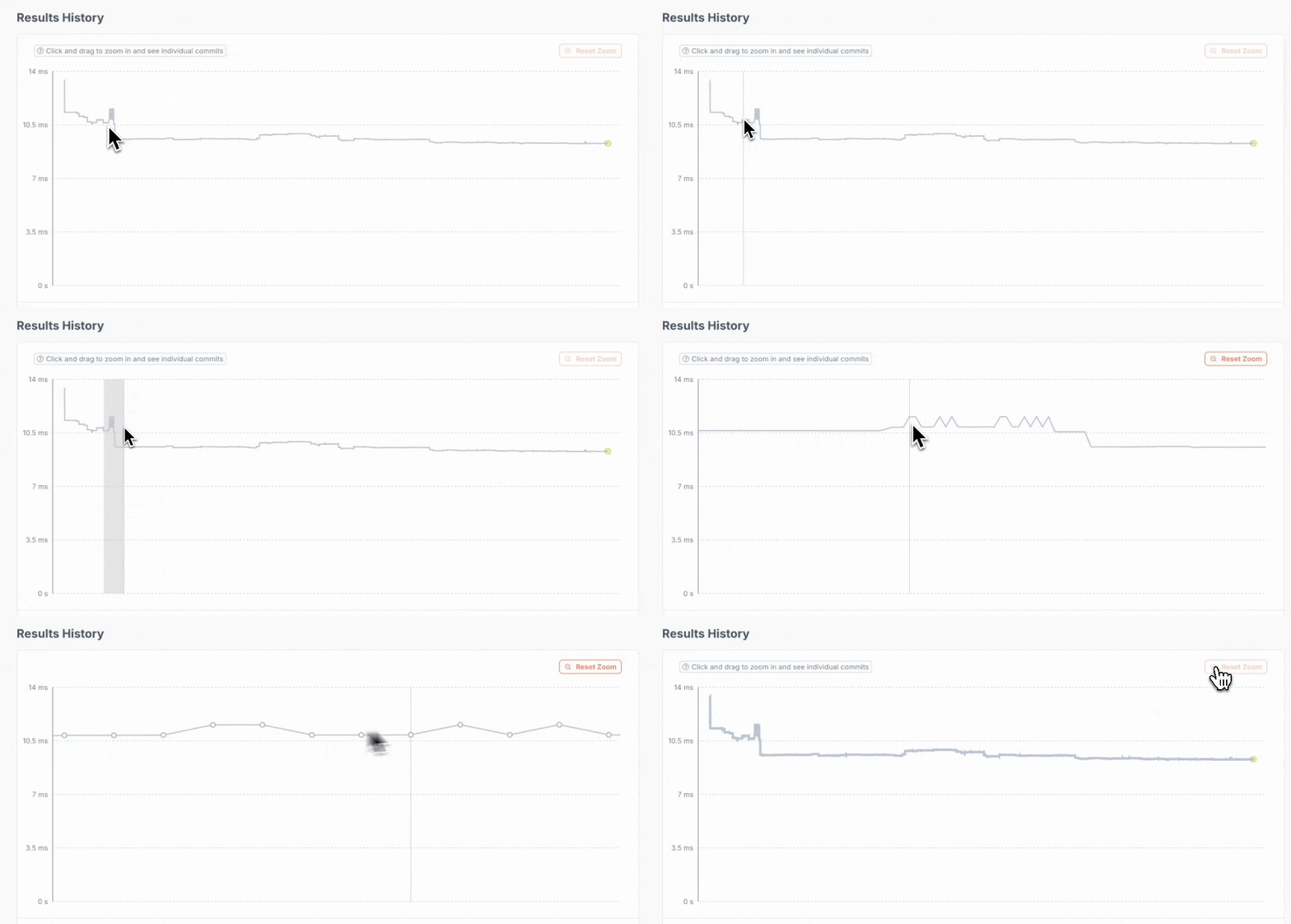
Zoom in the benchmark history
It's now possible to zoom in on the benchmark history graph. Making it possible to dive precisely in the history.
New runs page
It is now possible to list all the runs of a repository independently from their
branch using the new runs page: 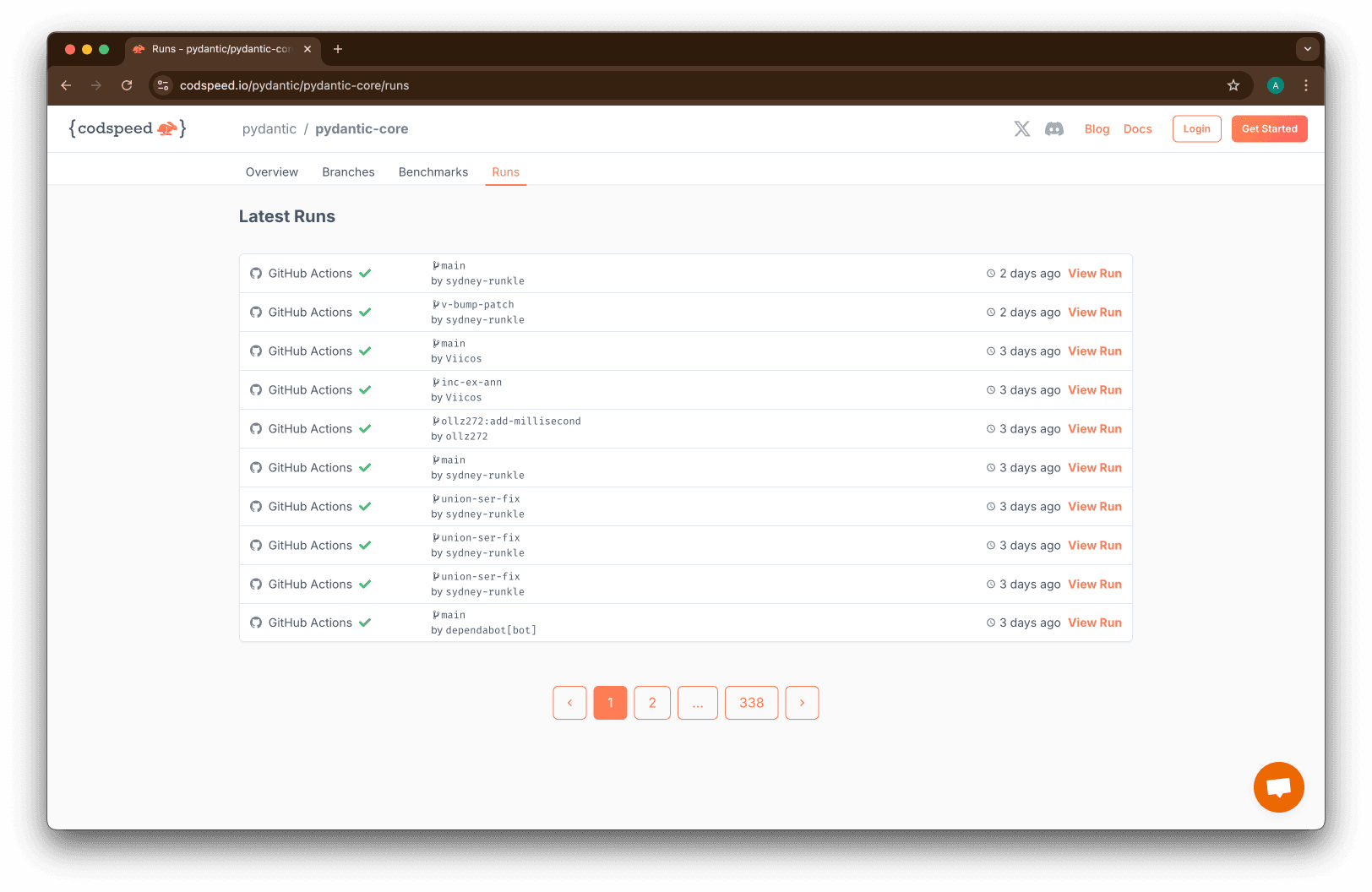 This page also come
with individual run pages, allowing for example to dive into the runs made on
push on a default branch:
This page also come
with individual run pages, allowing for example to dive into the runs made on
push on a default branch: 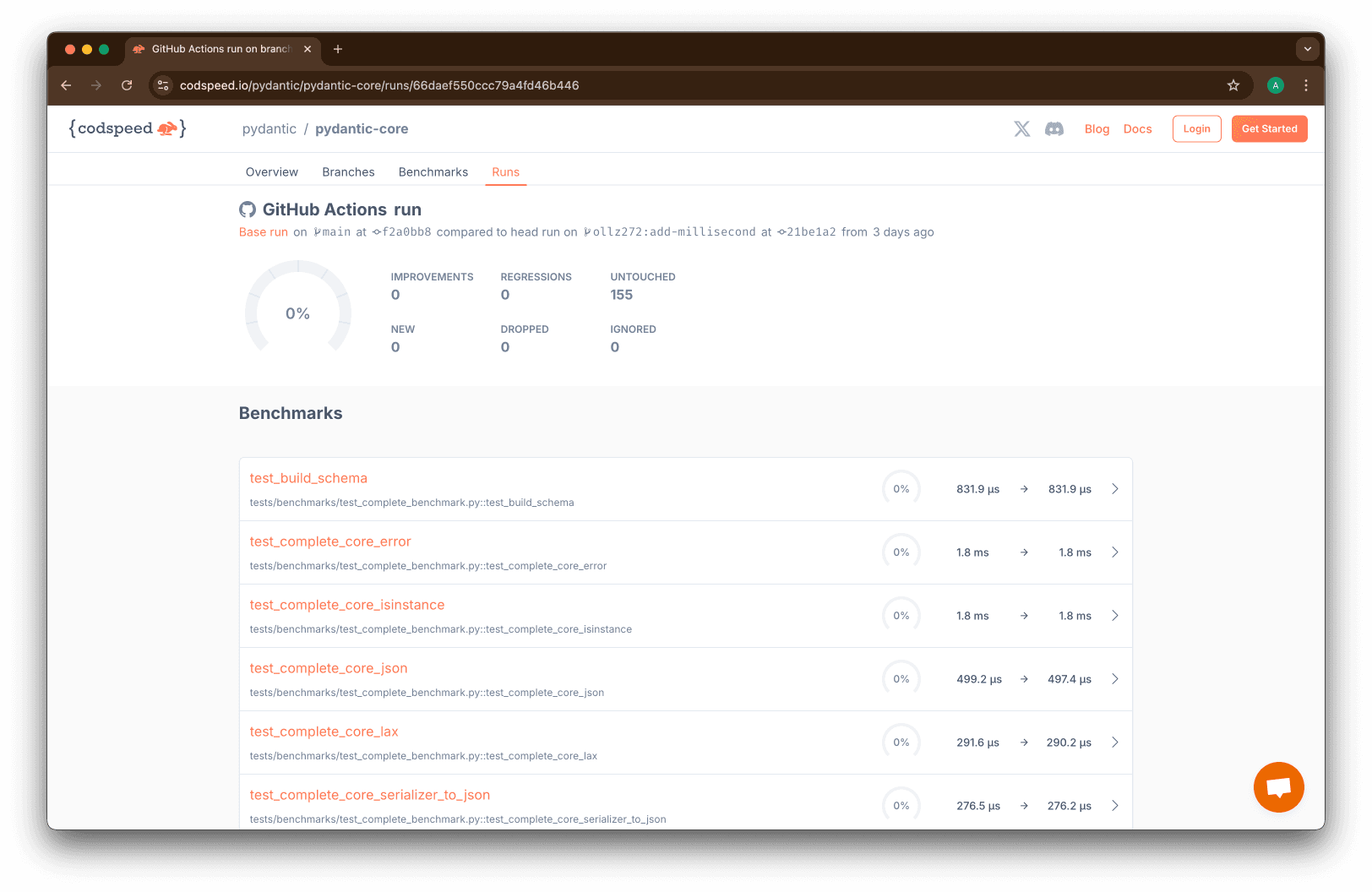
CodSpeed CLI Beta
We just released the beta of the CodSpeed CLI! 🥳
This CLI tool allows to make local runs, upload them to CodSpeed, and compare the results to a remote base run. All without having to push your code to a remote repository.
This will help you shorten the feedback loop on performance, you will not have to push your code and wait for the GH Action to complete to see the impact of your changes.
Trying it out
At the moment it only works on Ubuntu 20.04/22.04 and Debian 11/12.
To get started, you can run the following commands:
# Install the codspeed cli
curl -fsSL https://codspeed.io/install.sh | bash

# Authenticate the CLI with your CodSpeed account
codspeed auth login

# Inside a repository enabled on CodSpeed
# By default, the local run will be compared to the latest remote run of the default branch
# If you are checked out on a branch that has a pull request and a remote run on CodSpeed, the local run will be compared to the latest common ancestor commit of the default branch that has a remote run
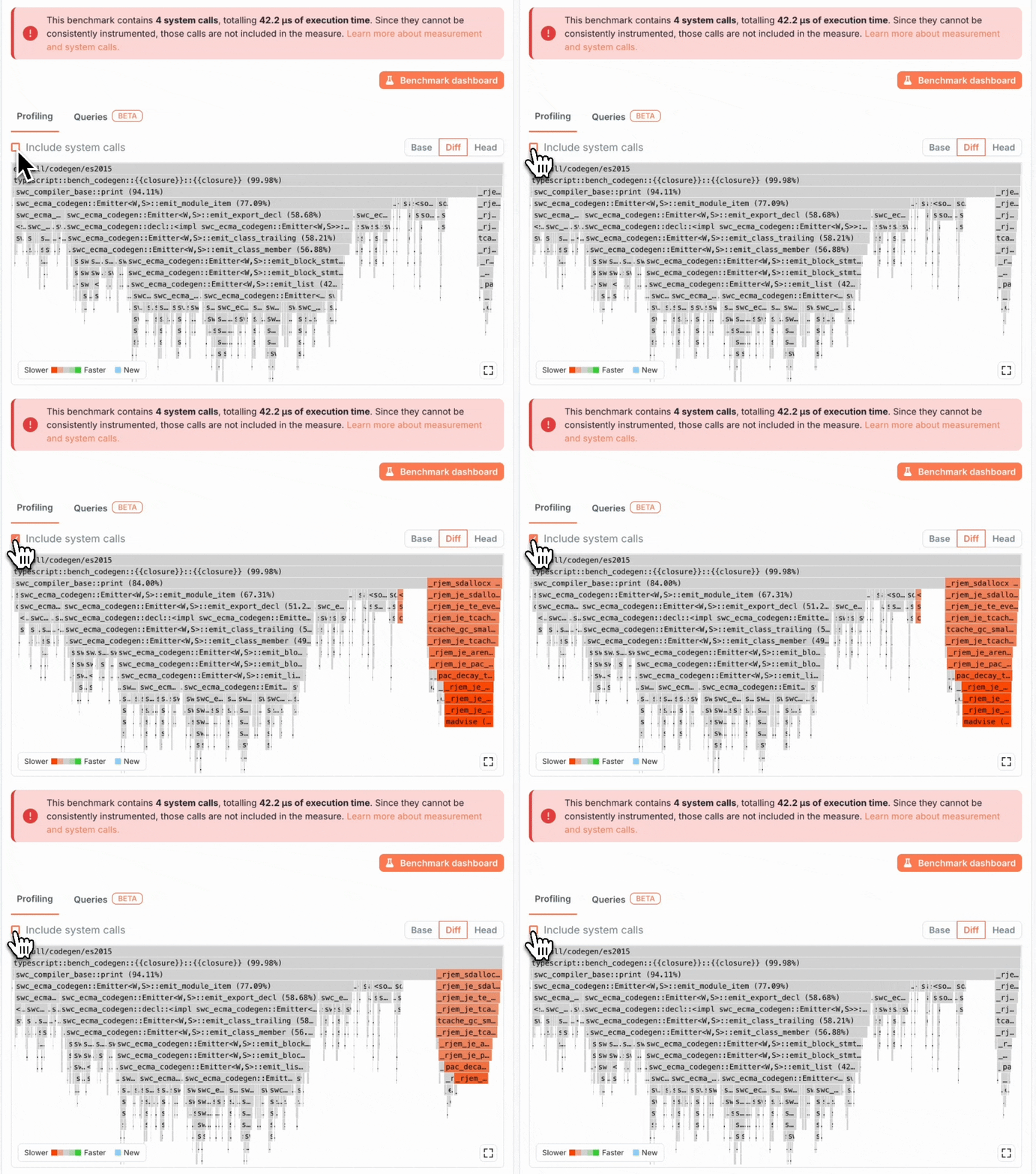
codspeed run [BENCHMARK_COMMAND]Include system calls in the flamegraphs
You can now see system calls in the flamegraphs by ticking the "Include system calls" checkbox.
We also now detect benchmarks mostly composed of system calls and display a flakyness warning.